
1.0 Document Purpose
This document provides a summary of the highlights of the CoreStream GRC Release 3.3 release. Major Platform releases are finalized every 2-3 months, depending on client and strategic priorities. These release notes are part of CoreStream GRC’s approach to keeping clients and partners informed of the improvements we are delivering.
This document summarizes the key user stories and issue fixes, categorized in the following ways, and specifies whether the change is available automatically as part of the upgrade or requires a configuration change.
| Strategic Features | The introduction of new Platform features is considered to be of strategic importance. |
| Core Features | Improvements to existing features or new functionality that is more limited in scope than the strategic features. |
| Configuration Improvements | Changes relating to improvements to our approach to configuration, focused on improving the efficiency, accuracy and consistency of Platform configuration. |
| Issue Fixing | The resolution of Platform issues. |
| Integrations | External applications or systems that CoreStream GRC has integrated with. |
| Technical | Improvements to the technical Platform elements. These improvements are typically non-functional. |
Please note that each category will not feature in every release update, and some may be more heavily weighted towards certain categories. As always, the plan is to focus on those items that add the most value to our clients.
2.0 Platform Team Overview
CoreStream GRC 3.3 is now live, delivering a broad set of enhancements focused on usability, clarity, and performance.
A key highlight of this release is the refreshed home page experience, introducing a new app-style design that provides a clearer, more visual way to navigate your site. As with most of our new features, adopting this is a choice – we won’t suddenly change your user experience on you!
CoreStream GRC 3.3 also contains a long-desired feature to integrate video content into the platform. During 2026, we will be integrating our video library on feature explainers, the use cases CoreStream GRC can support, and more about us as an organization. From 3.3 on, you will be able to make your own video content available too!
Significant improvements have also been made to our risk aggregation reporting. These include Excel exports, flexible text wrapping and font sizing, expanded filtering, and richer threshold information. These updates make it easier to interpret Risk data, tailor views to your needs, and work with charts both inside and outside the platform.
We’ve also continued to refine day-to-day usability across forms, Bowtie diagrams, and navigation. These include color-coded fields in forms, fixed headers to keep key information visible while scrolling, clearer and more informative Bowtie diagrams, and improved search and interaction across grids and treeviews. These updates are designed to reduce friction, surface important information more quickly, and support more efficient workflows.
Behind the scenes, we’ve delivered meaningful configuration, performance, and reliability improvements. These include a major overhaul of the configuration validator, performance optimizations for large datasets, improved exports, and fixes to email rendering and filtering behavior. We’ve also updated our VinciWorks eLearning integration and strengthened the platform’s security posture with automated vulnerability scanning.
Together, these enhancements continue to strengthen CoreStream GRC’s flexibility and scalability, supporting more efficient configuration and a smoother experience as sites grow in size and complexity.
3.0 Release Notes
3.1 Strategic Features
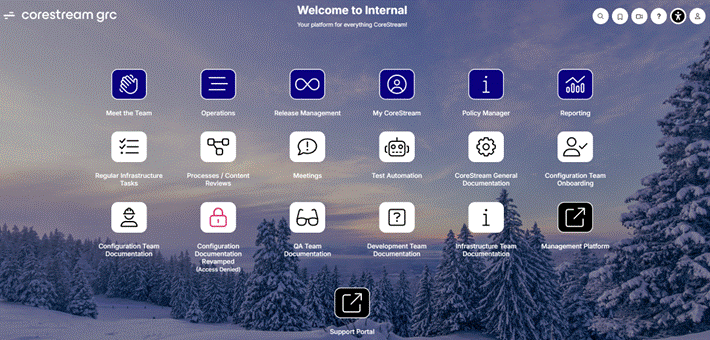
New Home Page Design
Configuration Required
We’ve refreshed the home page with app-style tiles, giving you a clean, visual way to navigate. Tiles can include icons, custom colors, and counts, making it easier for you to get to the areas and resources that matter most.
External Links on the Home Page
Configuration Required
The home page can now be configured to include links to external websites or documents. This enhancement provides quick access to related platforms, support resources, or key reference materials, all from a central starting point. You can seamlessly move between CoreStream GRC and other resources, saving time and simplifying workflows.
Integrated Video Content
Configuration Required
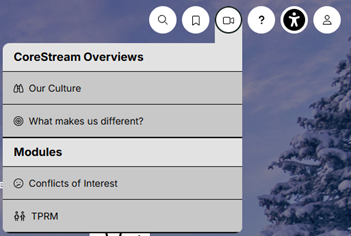
We’ve added support for integrated video content directly within the platform. Sites can be configured to include videos such as how-to guides, platform overviews, or other relevant content. You can access this content without leaving the platform, making it easier to learn, get context, and find helpful information exactly when you need it.

Risk Visual Export to Excel
Configuration Required
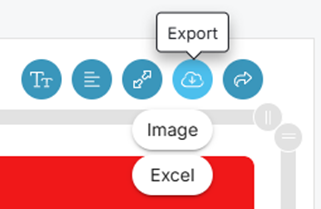
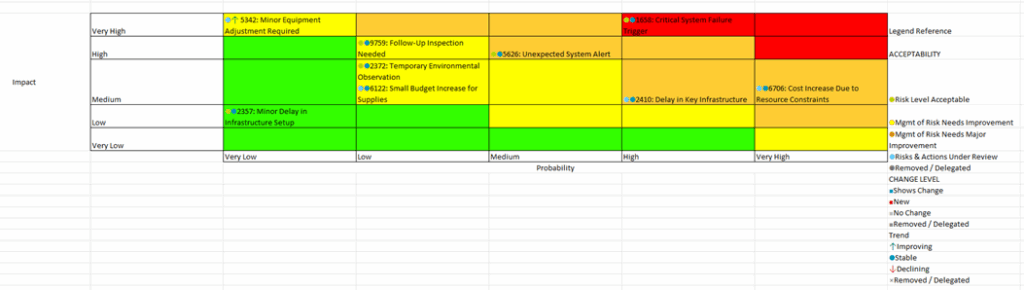
You can now export Risk Visual charts directly to Excel. Each quadrant is clearly represented, with associated Risks listed in their respective areas. This gives you the flexibility to resize cells, adjust font sizes, and work with the data more easily when image exports aren’t suitable.
Risk Visual Text Wrapping
Automatically added
Risk titles in Risk Visual charts can now wrap across multiple lines, similar to how text wrapping works in Excel. You can turn wrapping on or off using a simple icon on the chart, and the text will automatically adjust as font sizes change or the chart is resized. This ensures Risk titles remain clear and readable, no matter how you view the chart.
Risk Visual Font Sizing
Automatically added
You can now personalize the font size used in Risk Visual charts. Titles automatically wrap as the font size changes, making charts easier to read whether you’re looking at a small number of Risks or a large register. Your font size preference is remembered for future sessions, so you get a consistent experience each time.

Persisting Filters Applied to Dashboards
Configuration Required
We’ve added the ability to enable filter persistence across a site’s dashboards. This means that once you apply filters to a dashboard, they will be remembered the next time you visit it. Additionally, when navigating between dashboards that share the same filters, those filters will be automatically applied, creating a more seamless and consistent user experience. This enables users to save time by not having to reapply filters, helps maintain context when reviewing related data, and improves overall efficiency when working across multiple dashboards within CoreStream GRC.
3.2 Core Features
Color Coded Fields in Forms
Configuration Required
We’ve added the ability to highlight certain fields in forms using color. Forms can be configured so that key fields such as status values stand out visually, making it easier to spot important information immediately.
Fields Visible in the Form Header
Configuration Required
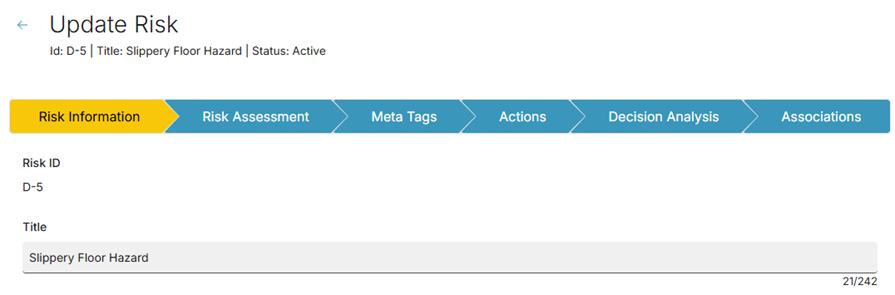
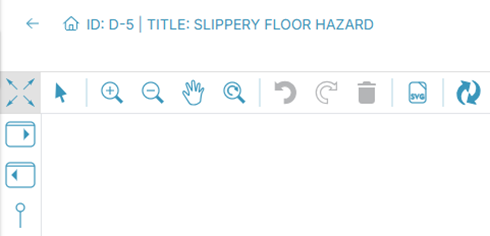
Forms can now display selected fields in a fixed header at the top of the page. These fields remain visible as you scroll and update dynamically as values change. This keeps key information such as IDs, Titles and status in view at all times, reducing the need to scroll back and forth.
Clearer Labelling in Bowtie Diagrams
Configuration Required
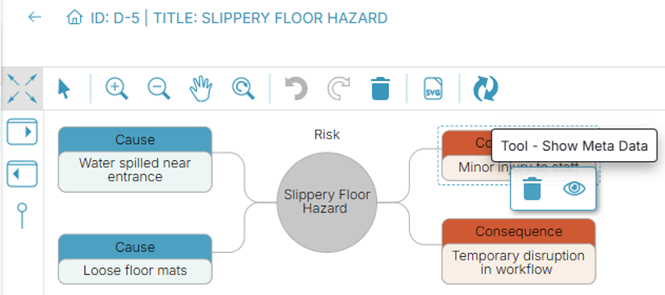
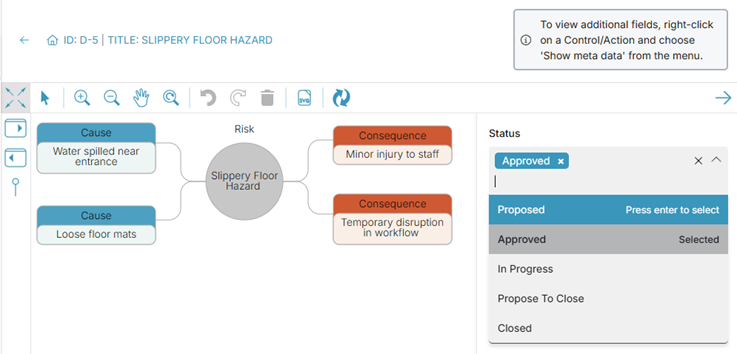
Bowtie diagrams now support custom labels for elements such as Causes, Consequences, Actions, and Risks. Each element displays a title with its description shown underneath, making diagrams easier to understand.

Bowtie Metadata for Causes and Consequences
Configuration Required
We’ve expanded Bowtie diagrams to show key metadata and details such as IDs and Titles for Causes and Consequences. You can interact with the diagram to view this information without leaving the Bowtie view

Custom Heading of Bowties
Configuration Required
We’ve added the ability to customize the heading shown on Bowtie diagrams. It can now be configured independently to include IDs, Titles, etc., giving you more control over how diagrams are titled and presented.

Date and Time Added to Export Titles
Automatically Added
We’ve added the option to include a date and time stamp in Excel and PDF exports from grids. You can choose to include this information when exporting, making it easier to identify when reports were generated.

Column Selector on Treeviews
Configuration Required
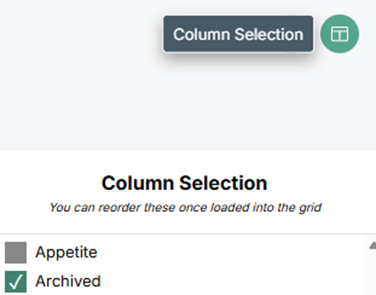
Column selectors are now available in treeviews, such as organizational hierarchies. You can show or hide columns to personalize your view, with preferences remembered for future visits. This brings treeviews in line with the existing grid experience
Search Comments in Grids and Treeviews
Configuration Required
We’ve added support for searching comments in grids and treeviews, so if a comment contains a specific word or mentions a user, the relevant rows will be returned. This makes it easier to find information and track discussions quickly.
Clickable Links in Comments
Automatically Added
Links pasted into comment fields are now automatically clickable in both view and edit modes. This makes it quicker and easier to access referenced content directly from comments, with links opening immediately in a new browser tab.
Risk Visual Updates to the Filters
Configuration Required
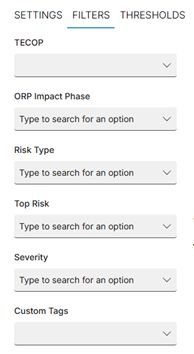
We’ve added multi-select filters to Risk Visual charts. You can now select additional options to refine the Risks displayed, making it easier to tailor the chart view to your needs.
Risk Visual Updates to the Thresholds
Configuration Required
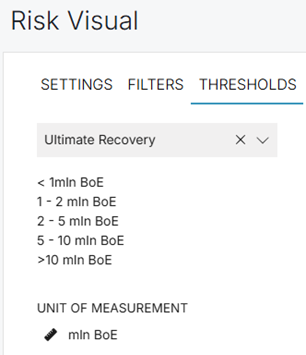
We’ve enhanced the thresholds legend in Risk Visual charts to display more context based on the selected organizational level. The legend can now show guidance values and the relevant unit of measurement, helping users better understand what each threshold represents when viewing data. This information is configurable to align with client preferences and reporting needs.
Associated and Nested Properties in Excel Exports
Automatically Added
Over recent releases, we’ve been moving away from overnight data synchronizations and toward real-time data updates. For example, if a Risk is associated with a Risk Register and the Register Owners are updated, those changes are now reflected immediately when viewing the Risks grid, rather than waiting for an overnight process. In CoreStream GRC 3.3, we’ve extended this capability to Excel exports, making it possible to include these associated and nested properties in your exported data so reports always reflect the most up-to-date information.
Improved Policy Manager Layout
Automatically Added
We’ve improved the layout of Policy Manager to make better use of available screen space. This allows more room for policy content, improving readability and reducing unused areas when fewer actions or attestations are present.
3.3 Configuration Improvements
Simplified Guidance Page Configuration
Automatically Added
We’ve streamlined the configuration of guidance pages to make them significantly easier and faster to set up. This simplification reduces complexity behind the scenes and makes the functionality more accessible for users of our Client Configuration UI, helping teams manage and maintain guidance content more efficiently.
Configuration Validator Overhaul
Automatically Added
Over the years, we’ve built an extensive configuration validation capability that automatically identifies potential configuration issues – ranging from minor optimizations to more critical concerns – and flags them to the configuration team. In 3.3, we’ve significantly overhauled this system by refining existing rules, removing those that are no longer relevant or have since been automated away, and improving overall accuracy. We’ve also expanded our automated resolver, allowing many identified issues to be corrected with a single click. The result is a smarter, more reliable validation process that helps keep configurations clean, consistent, and easier to maintain.
3.4 Issue Fixing
Improved Email Rendering in the Latest Version of Outlook
Automatically Added
Following a recent Outlook update used by many of our clients, some previously well-formatted CoreStream GRC emails were displaying incorrectly at certain screen sizes. We’ve updated our email templates to ensure they now render consistently and as intended in the latest version of Outlook, improving readability and overall presentation across devices.
Fixed Filter Reset Issue When Using the Risk Bowtie Beautify Button
Automatically Added
We previously added filtering to Risk Bowties to help focus on only the associated actions you’re interested in. A small issue was identified where using the Beautify button would clear any applied filters. This has now been resolved, ensuring your selected filters remain in place when adjusting the bowtie layout.
3.5 Integrations
VinciWorks Integration (Using Generic Integration Capability)
Configuration Required
We’ve integrated CoreStream GRC with our sister company, VinciWorks, who provide online compliance and risk training solutions. This integration allows training data and outcomes to be connected more seamlessly with CoreStream GRC, helping clients link learning activity with their wider GRC processes and reporting. Importantly, this has been delivered using our generic integration capability, meaning future integrations can be enabled through configuration rather than bespoke development – making it faster and more flexible to connect CoreStream GRC with other platforms over time.
3.6 Technical
More Performant Grid Loading
Automatically Added
Our backend team identified an opportunity to improve grid performance by separating the loading of grid rows from the total row count shown at the bottom of the screen. Previously, the grid would wait for both to complete before displaying any data. Since the count query typically takes longer (as it scans the full dataset, while only a subset of rows is loaded initially), this could delay what users see. Now, grid rows load and display as soon as they’re ready, with the total count updating shortly after – resulting in a faster, more responsive experience.
Consolidated User Field for Improved Performance
Configuration Required
As CoreStream GRC sites grow in size and complexity, permission models naturally become more sophisticated – and that can introduce performance trade-offs. To address this, we’ve introduced support for a single consolidated user field that brings together all users who have access to a record, regardless of how many underlying permission fields are involved. Instead of checking multiple user fields for every row, CoreStream GRC can now evaluate access against one consolidated field, significantly reducing processing overhead and improving performance on large datasets, even at a very high scale.
Automated Vulnerability Scanning
Automatically Added
We’ve introduced automated vulnerability scanning across the platform to continuously identify potential security issues without the need for manual scans. These checks now run automatically and generate tasks directly for our technical team, enabling faster visibility, quicker remediation, and an overall stronger security posture for CoreStream GRC.
About Rich Eddolls
Richard is a co-founder and Chief Product Officer at CoreStream GRC, where he’s redefining the way organizations approach governance, risk, and compliance. With 20 years of experience in business-driven GRC system design and a background at Deloitte, Richard is all about challenging the status quo and delivering technology that actually works. As the visionary behind the CoreStream GRC platform, he’s committed to building solutions that don’t just promise change – but deliver it. Outside of the office, Rich is a golfer, soccer player, and proud husband and father, always looking for the next challenge – whether on the field or at home.
Follow Rich on LinkedIn here.
About Cam McNair
Cam is Head of Platform Design at CoreStream GRC, where he’s redefining how platform innovation happens – from solving day-to-day configuration challenges to building out features that scale. With a background in data analysis and technical solution design, Cam’s all about turning complex business needs into simple, powerful tools that actually work. He leads a team of Solution Architects who double as Product Owners, delivering real impact across the platform. As the driving force behind CoreStream GRC’s product evolution, Cam’s focused on creating solutions that don’t just tick boxes, but move things forward.
Follow Cam on LinkedIn here.
FAQ on CoreStream GRC 3.3 Release
CoreStream GRC 3.3 is the latest major platform release from CoreStream GRC, focused on usability improvements, stronger risk reporting, performance gains, and more flexible configuration. Like all major releases, it reflects direct client feedback and real-world usage across complex GRC environments.
CoreStream GRC 3.3 went live in January 2026. Major platform releases typically roll out every two to three months, depending on client needs and strategic priorities.
The most notable updates include:
1. A redesigned app-style home page with configurable tiles
2. Integrated video content inside the platform
3. Major improvements to Risk Visual charts, including Excel export and readability controls
4. Stronger dashboard filtering with filter persistence
5. Performance improvements for large datasets
6. A smarter, more accurate configuration validator
These changes focus on reducing friction, improving clarity, and scaling better as sites grow.
The home page now supports a modern, app-style layout using configurable tiles. Tiles can display icons, colors, counts, and direct links, including links to external systems or documents. This gives users a faster, more visual way to navigate to what matters most.
Importantly, this update is optional. Existing home page experiences are not changed without client choice.
Yes. CoreStream GRC 3.3 introduces native video support inside the platform. Organizations can embed how-to guides, internal training, or explainer videos directly into pages, so users do not need to leave the system to learn or get context.
CoreStream will also be rolling out its own product and use-case video library throughout 2026.
No changes are forced. Features that could impact user experience or workflows require configuration and client choice. Automatic updates focus on performance, reliability, and quality improvements that work behind the scenes.