
1.0 Document Purpose
This document provides a summary of the highlights of the CoreStream GRC Release 3.4 release. Major Platform releases are finalized every 2-3 months depending on client and strategic priorities. These release notes are part of CoreStream GRC’s approach to keeping clients and partners informed of the improvements we are delivering.
This document summarizes the key user stories and issue fixes, categorized in the following ways, and specifies whether the change is available automatically as part of the upgrade, or requires a configuration change.
| Strategic Features | The introduction of new Platform features considered to be of strategic importance. |
| Core Features | Improvements to existing features or new functionality that is more limited in scope than the strategic features. |
| Configuration Improvements | Changes relating to improvements to our approach to configuration, focused on improving the efficiency, accuracy and consistency of Platform configuration. |
| Issue Fixing | The resolution of Platform issues. |
| Integrations | External applications or systems that CoreStream has integrated with. |
| Technical | Improvements to the technical Platform elements. These improvements are typically non-functional. |
Please note that each category will not feature in every release update, and some may be more heavily weighted towards certain categories. As always, the plan is to focus on those items that add the most value to our clients.
2.0 Platform Team Overview
CoreStream GRC 3.4 is now live, bringing a mix of powerful new features, performance improvements, and technical upgrades.
One of the headline features is Personalized Grid Tabs, allowing users to save filtered views of any grid as dedicated tabs that can be named, shared, and remembered across sessions. Combined with enhancements to existing reporting, 3.4 gives users more control over how they visualize and interact with their data than ever before.
On the technical side, this release includes an upgrade to .NET 10, improvements to identity management with a Backend-for-Frontend (BFF) approach, and enhanced API Export and Generic Integration capabilities. These upgrades improve system reliability, security, and integration flexibility for clients.
Other notable updates include Virtual Data Tables, allowing flexible views of transformed data without storing additional records; Global Context Settings, making it easier for users to filter and focus on the data that matters to them; and a range of UI and usability improvements in Policy Manager. Together, these updates continue to enhance both the configurator and end-user experience while supporting CoreStream’s high-performance, scalable platform.
Looking forward to 3.5 and FY27 more broadly, there is a lot of excitement around the features will be delivering. There is certainly an Artificial Intelligence theme emerging, with us continuing to deliver on our strategy to integrate with leading providers and ensure such capabilities are integrated into your CoreStream GRC powered workflows in a way that balances the potential benefits with the risks of over-reliance. Our next release will also see us dip our toe into the world of AI driven configuration. This, coupled with our uniquely flexible architecture, is another potential game changers for our clients, enabling us to cover even more ground and deliver CoreStream GRC level bespoke solutions in even less time.
We also have an upcoming customer community showcase event on April 23rd 2026, where we will be going into these items in more detail, if you’d like to attend, please enquire here.
3.0 Release Notes
3.1 Strategic Features
Calculated Fields in Forms – Further Enhancements
Configuration Required
In 3.1 we added the ability for calculated values to display instantly in a form, without needing to save – for example, providing a dynamic risk score and RAG rating from likelihood and impact. In 3.4, we’ve expanded this functionality significantly: calculationscan now be applied to a wider variety of field types, and fields can also be made editable, allowing users to start with a calculated value and adjust it where needed.
We’ve also extended support to sub-forms, enabling calculations to work seamlessly across both main forms and their related sub-forms. For example, you can calculate a total score in a parent form based on values entered in multiple sub-form records, or dynamically update sub-form fields based on inputs in the main form; creating a more powerful and connected user experience.
Chart Version Comparison
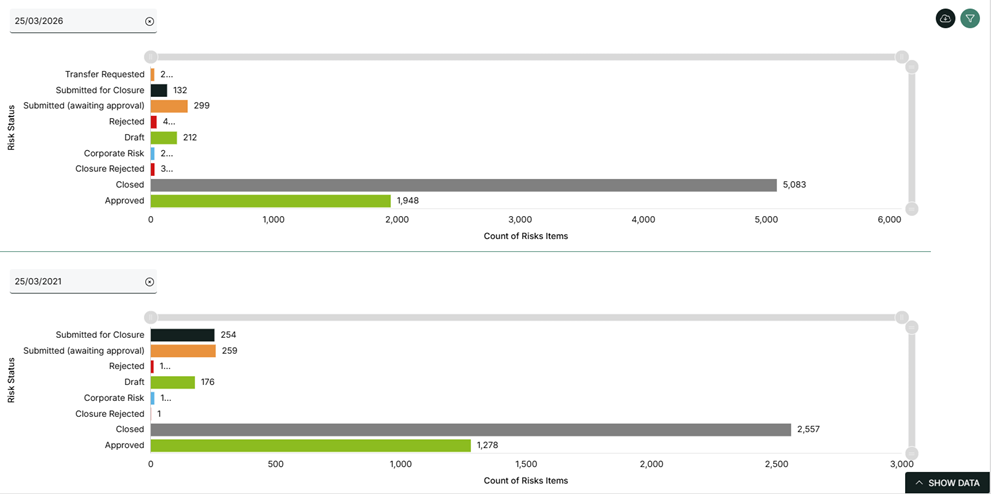
We’ve introduced the ability to compare data across different points in time using a split-screen view. By applying snapshot filters, each chart can display data from a specific date, making it easier to track changes, understand trends and measure progress over time.
New Data Aggregation Table
Configuration Required
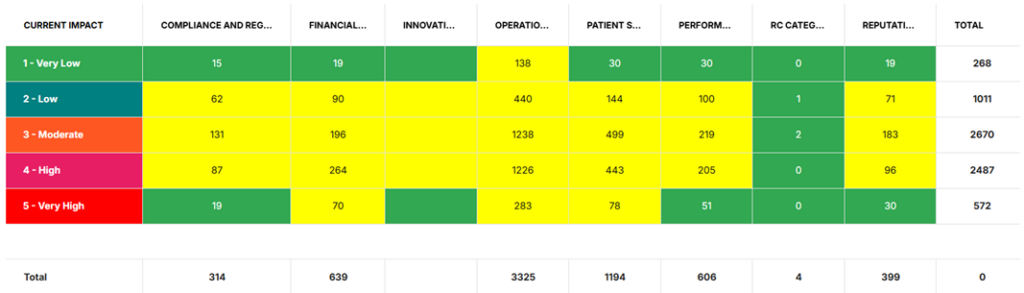
We’ve introduced a new Data Aggregation Table to complement our existing suite of dashboard charts and reports. This feature allows you to define rows and columns, choose an aggregation type (such as sum, count, average, max, or min), and visualize the results in a clear, tabular format.
The table also supports color coding and data filtering, making it easy to highlight key insights at a glance. It’s fully available within the Admin User Reporting Wizard, meaning clients can configure these reports themselves in just a few clicks – no need for CoreStream GRC support
Personalized Grid Tabs
Automatically Added
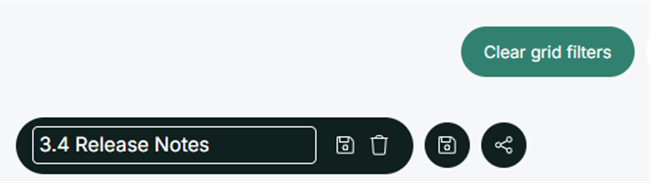
In 3.4, you can now save filtered grid views as personalized tabs. After applying filters to a grid, you’ll have the option to save that view as a dedicated tab, give it a name, and it will remain on that grid until you choose to rename or remove it. These tabs can also be shared with others, making it easier to collaborate and ensure everyone is working from the same view of the data. As always, underlying permission structures are respected, so users will only see data they are authorized to access.
Excel Exports with Multi-Level Linked Data
Automatically Added
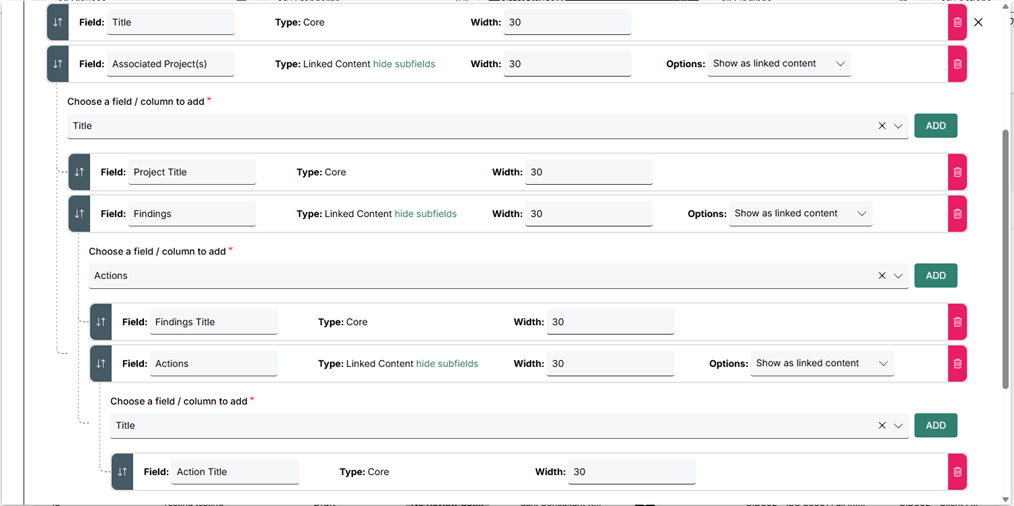
Excel exports now support multiple levels of linked data, allowing you to include related records within a single export. This makes it easier to extract and analyze connected information – such as Audits, their Observations, and associated Actions – all in one place.
This enhancement also includes a full rebuild of the export functionality, improving performance, and making large, complex exports faster and more reliable.
Virtual Data Tables
Configuration Required
What began as a need to create a clearer view of configuration history -helping us better audit changes made by both our team and client administrators – has evolved into a powerful new feature: Virtual Data Tables.
Much like standard data tables, virtual tables can be used to power grids, reports, and forms. However, instead of storing data, they dynamically transform and present data from one or more existing tables. This opens up a wide range of possibilities without adding complexity to your underlying data model.
Use cases are highly flexible and can be tailored to your needs. For example, you might pivot questionnaire data to show one row per answer, create custom views of configuration data (such as all email settings in one place), or build a centralized “notification center” showing all records across the system that require your attention.
Policy Management Solution Enhancements
Automatically Added
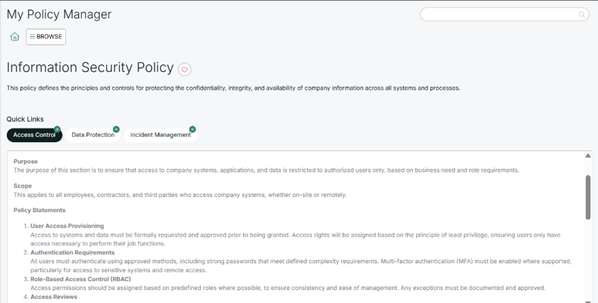
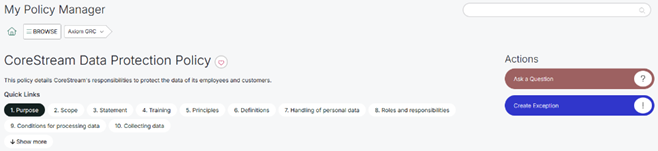
In 3.4, we’ve added several user interface improvements to Policy Manager, focused on making better use of full-screen space. Key updates include: hiding empty attestations grids when no attestations are required, expanding the home screen image to full width when no actions are configured, widening the policy content area when there is no associated content, and collapsing quick links to sections when they span more than one row. These changes make navigating and viewing policies cleaner and more intuitive.
Learn more about the solution:
Global Context Setting
Configuration Required
Ever wanted to see all your screens filtered to only the data that matters most in the moment? For example, if you’re a Risk Manager focusing on a specific business unit or risk category, you can now apply a global context filter to tailor your entire view.
In 3.4, you can set a global context that is retained in your personalized settings, automatically filtering data across all relevant screens until you choose to clear it. This creates a more focused, streamlined experience -helping you stay in context, reduce noise, and work more efficiently without needing to repeatedly apply the same filters.


3.2 Core Features
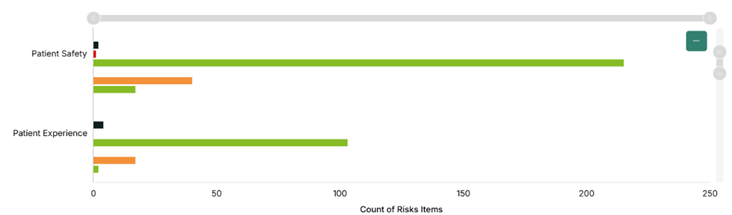
Side-by-Side Option for Stacked Bar Charts
Configuration Required
We’ve reintroduced a popular feature from our earlier reporting capabilities, allowing you to switch stacked bar charts to a side-by-side view. This option is particularly useful when you want to compare values across categories more easily, making differences between data sets clearer at a glance
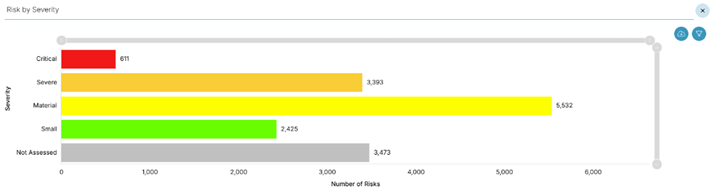
Data Labels on Reporting Charts
Configuration Required
We have added a feature that displays count labels directly on reporting charts. This allows you to see the values without having to hover over the bars. As a result, you can gain a clearer and quicker understanding of your data and interpret the chart results more efficiently.
Jump from Grid to Dashboard with Filters
Configuration Required
Getting to the insights quickly is important, and now you can with a new way to move seamlessly from grid view to a dashboard. When you select a record and choose “Jump to Dashboard”, the dashboard opens with filters automatically applied based on that record’s properties, showing all related data in the same category, organization, or field. This makes it faster to explore relevant data without manually applying filters, helping you see the full picture immediately.
Some styling updates to the Line Charts
Configuration Required
We’ve added additional styling options for line charts to make them more flexible across a wider range of use cases. You can now adjust the size of data point markers – including removing them entirely – and control.
3.3 Configuration Improvements
Automated Creation of Starting Point Synchronization
Automatically Added
We’ve introduced a new capability in the Configuration Admin Panel to automatically generate hierarchy synchronization jobs. With the click of a button, CoreStream GRC can now analyze your configuration, identify fields that require synchronization (such as those inheriting values from another object), and create the appropriate job automatically.
This removes the need for manual setup, reduces the risk of configuration errors, and ensures synchronization is implemented quickly and consistently.
Consolidated User Fields
Configuration Required
For sites with highly complex permission structures, large data volumes, and many concurrent users, performance can be impacted due to the need to enforce permissions consistently across all areas of the platform – grids, tile counts, charts, and more.
To address this, we’ve introduced Consolidated User Fields. This approach automatically compiles all users with access into a single field, allowing permission checks to be performed against one source rather than multiple fields. For example, instead of querying 10 separate fields (and applying permissions to each), CoreStream GRC can now perform a single, more efficient check – significantly improving performance.
This enhancement has been designed to require minimal effort from configurators and no change in experience for end users, while delivering faster and more scalable performance behind the scenes.
Email Configuration Revamp
Configuration Required
We’ve reworked how emails are configured in CoreStream GRC, with the goal of gradually putting more control into the hands of our clients. This is the first step in that journey, simplifying the underlying setup and laying the groundwork for more flexible email management in future releases.
Looking ahead, this will enable features such as optional subscription and unsubscription preferences – giving users more control over the notifications they receive, while still supporting clients who prefer stricter reminder processes for items like overdue actions.
3.4 Issue Fixing
Column Selector Works Across All Tabs
Automatically Added
We’ve fixed an issue where adding or adjusting columns in different tabs sometimes required a page refresh. Now, you can update columns in any tab instantly, making it easier to see and organize your data exactly how you want.
New Home Screen Count Refresh Fix
Automatically Added
Following the introduction of the optional new home screen in 3.3, we identified a minor issue where tile counts were not always refreshing when navigating back to the home screen (without a full page reload). This has now been resolved, ensuring counts are consistently up to date whenever you return – giving you confidence that the information you’re seeing is always accurate.
Form Close and Cancel Buttons Fixed for “Save and Continue“
Automatically Added
We’ve fixed an issue with forms accessed from the homepage where the Save and Continue option prevented the Close or Cancel buttons from working. Now, after choosing Save and Continue, you can exit or cancel the form at any time.
Correct Pop-Up Behavior for Expandable Sub-Forms
Automatically Added
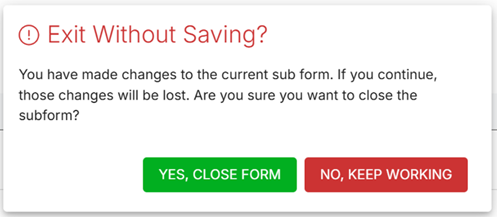
We’ve fixed a minor issue with the Expandable Sub-Form feature where exiting a newly created sub-form would incorrectly display a “Save Changes” prompt. This has now been corrected to show the appropriate “Exit Without Saving” option, ensuring a clearer and more intuitive user experience.
3.5 Integrations
SFTP Integration with Key-Pair Authentication for CSV Exports
Configuration Required
We’ve enhanced our CSV Export Background Service to support secure file transfers via SFTP using key-pair authentication. This provides a more robust and secure method for exporting data to external systems, eliminating the need for password-based authentication.
With this update, clients can configure automated exports that connect to SFTP servers using industry-standard key-pair authentication, improving both security and reliability for data integrations. This enhancement builds on our existing integration capabilities, making it easier to meet enterprise-level security requirements for file-based data exchange.
API Export Enhancement – Attachments in Base64
Configuration Required
Many of our clients use API Exports to pull data from CoreStream GRC into other systems, BI tools, or data lakes. In 3.4, we’ve enhanced this capability to allow attachments to be exported in base64 format. Once received by the client’s target system, these attachments can be converted back to their original file format, making it easier to transfer files alongside standard data exports and ensuring seamless integration with downstream systems.
Generic Integrations Support for File Content as Plain Bytes
Configuration Required
We’ve enhanced our Generic Integrations capability to allow file content to be sent as plain bytes within a multipart/form-data structure. This enables integrations with tools like Sannos, allowing documents to be reviewed against regulatory standards, checked for compliance, and analyzed for potential gaps – streamlining audits and ensuring greater confidence in document accuracy.
DocuSign Integration Moved to Generic Integration Framework
Configuration Required
Our DocuSign integration has been migrated from a bespoke implementation into our Generic Integration framework. This is a strong example of how flexible and powerful our integration capability has become.
With only a small extension to support DocuSign’s specific authentication requirements, the integration now offers greater configurability than before. It also opens the door to integrating with other document signing providers in the future, giving clients more choice and flexibility without requiring custom development.
SCIM Support for User Synchronization
Configuration Required
We’ve introduced support for SCIM (System for Cross-domain Identity Management) to enable automated synchronization of user details between your identity provider and the CoreStream GRC platform. This allows user information – such as names, roles, and group memberships – to be kept up to date automatically, reducing the need for manual user management.
By integrating directly with your identity provider, SCIM helps ensure greater consistency, improves security, and streamlines user provisioning and deprovisioning processes across your organization.
3.6 Technical
Identity Management Improvements (BFF Architecture)
Automatically Added
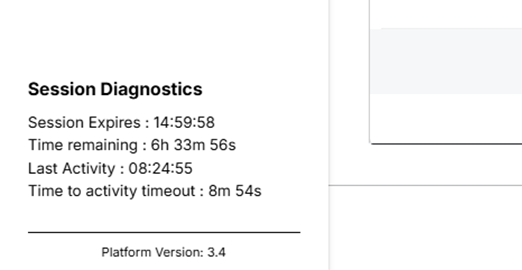
We’ve begun implementing a Backend-for-Frontend (BFF) approach to identity management, representing a significant evolution of our previous authentication architecture. This change is designed to simplify how identity is handled across both the front end and back end of the platform.
As a result, users can expect a more reliable and consistent authentication experience, including a reduction in unexpected logout scenarios and improved overall session stability. This work lays the foundation for further enhancements to security and user experience in future releases.
Upgrade from .NET 8 to .NET 10
Automatically Added
We’ve upgraded the CoreStream GRC platform from .NET 8 to .NET 10, ensuring we stay aligned with the latest advancements in the Microsoft technology stack. This upgrade brings improvements in performance, security, and long-term support, helping to keep the platform fast, stable, and future-ready.
While this is primarily a behind-the-scenes enhancement, it provides a stronger foundation for ongoing development and enables us to continue delivering new features and improvements more efficiently.
About Rich Eddolls
Richard is a co-founder and Chief Product Officer at CoreStream GRC, where he’s redefining the way organizations approach governance, risk, and compliance. With 20 years of experience in business-driven GRC system design and a background at Deloitte, Richard is all about challenging the status quo and delivering technology that actually works. As the visionary behind the CoreStream GRC platform, he’s committed to building solutions that don’t just promise change – but deliver it. Outside of the office, Rich is a golfer, soccer player, and proud husband and father, always looking for the next challenge – whether on the field or at home.
Follow Rich on LinkedIn here.
About Cam McNair
Cam is Head of Platform Design at CoreStream GRC, where he’s redefining how platform innovation happens – from solving day-to-day configuration challenges to building out features that scale. With a background in data analysis and technical solution design, Cam’s all about turning complex business needs into simple, powerful tools that actually work. He leads a team of Solution Architects who double as Product Owners, delivering real impact across the platform. As the driving force behind CoreStream GRC’s product evolution, Cam’s focused on creating solutions that don’t just tick boxes, but move things forward.
Follow Cam on LinkedIn here.
CoreStream GRC 3.4 introduces several strategic enhancements, including Personalized Grid Tabs, Virtual Data Tables, Global Context Setting, and expanded Calculated Fields in Forms. The release also improves reporting with features like Chart Version Comparison, Data Aggregation Tables, and multi‑level Excel exports, giving users more powerful ways to view and analyze data.
Personalized Grid Tabs allow users to save filtered views as custom tabs, name them, and share them with others. These saved views persist across sessions and respect existing permission controls. This helps users quickly access their preferred datasets, reduces repetitive filtering, and supports better team collaboration.
Version 3.4 delivers key platform‑wide performance and security improvements, including an upgrade from .NET 8 to .NET 10, the introduction of a Backend‑for‑Frontend (BFF) identity architecture, enhanced API export capabilities, and support for SCIM user synchronization. These changes improve reliability, stability, and integration flexibility.
CoreStream GRC 3.4 includes several reporting upgrades designed to help users gain insights faster. New features include side‑by‑side bar chart views, data labels on charts, jump‑from‑grid to dashboard filtering, and the new Data Aggregation Table. Combined with multi‑level Excel exports, these tools make it easier to compare datasets, track changes over time, and visualize complex information.