
1.0 Document purpose
This document provides a summary of the highlights of the CoreStream GRC Release 3.5 release. Major Platform releases are finalized every 2-3 months depending on client and strategic priorities. These release notes are part of CoreStream GRC’s approach to keeping clients and partners informed of the improvements we are delivering.
This document summarizes the key user stories and issue fixes, categorized in the following ways, and specifies whether the change is available automatically as part of the upgrade, or requires a configuration change.
| Strategic Features | The introduction of new Platform features considered to be of strategic importance. |
| Core Features | Improvements to existing features or new functionality that is more limited in scope than the strategic features. |
| Configuration Improvements | Changes relating to improvements to our approach to configuration, focused on improving the efficiency, accuracy and consistency of Platform configuration. |
| Issue Fixing | The resolution of Platform issues. |
| Integrations | External applications or systems that CoreStream GRC has integrated with. |
| Technical | Improvements to the technical Platform elements. These improvements are typically non-functional. |
Please note that each category will not feature in every release update and some may be more heavily weighted towards certain categories. As always, the plan is to focus on those items that add the most value to our clients.
2.0 Platform team overview
CoreStream GRC 3.5 is now live, delivering a stronger reporting capability, improvements to our workflow engine, and another milestone in our ambition to deliver the most configurable platform of its type. A key theme throughout this release is helping users get to the right outcome more quickly – whether that is through clearer in-form guidance, more effective data visualization, or smarter support for the teams configuring and evolving the platform.
On the feature side, 3.5 introduces new visual reporting options including scatterplots and treemaps with drill-through capability, alongside additional flexibility in our Data Aggregation Table through weighted averages and support for negative scoring. Together, these enhancements expand the ways clients can analyze, interpret, and act on data inside CoreStream GRC. They also power our move into risk quantification in the CoreStream GRC way – enabling what is a complex feature in a way that is straight forward to engage with.
We have also focused on reducing friction in day-to-day workflows. The ability to trigger workflows at relevant points in forms (rather than once, at the end), improved sub-form loading and presentation, clearer guidance on workflow nuance, and a series of usability refinements all contribute to a smoother end-user experience. These updates are complemented by export and integration improvements, including enhancements to custom Word exports and our SharePoint/OneDrive integration capability.
One of the most exciting developments in this release is the introduction of our AI-Powered Configuration Assistant. This is an early but important step in applying AI to the configuration experience in a way that is practical, assistive, and aligned with the needs of teams delivering highly configurable solutions. Combined with simpler configuration management and technical improvements behind the scenes, 3.5 continues to strengthen both the flexibility of the platform and the efficiency with which we can deliver the tailored solutions our clients have come to expect.
3.0 Release Notes
3.1 Strategic features
CoreStream GRC AI-Powered Configuration Assistant
Configuration Required
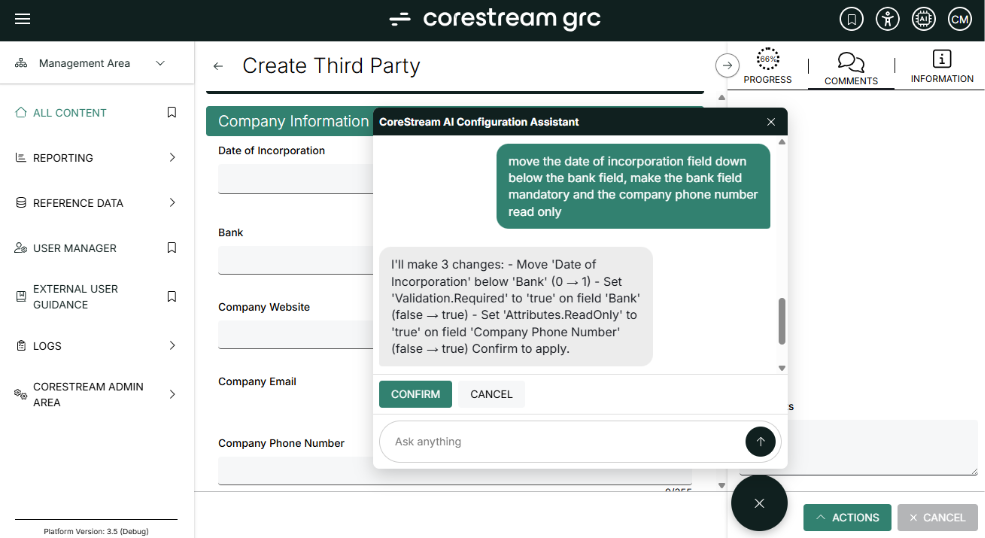
The AI-Powered Configuration Assistant marks a major advancement in CoreStream GRC’s use of artificial intelligence. This tool allows configurators to efficiently customize CoreStream GRC for clients using natural language instructions, both individually and in bulk. It features a preview mode, presents proposed updates for review, and enables users to confirm or interact with changes before finalizing, resulting in enhanced efficiency and control during platform customization. The initial release focuses on form edits, and we plan to expand these capabilities across all configuration areas over time. When users have questions about the assistant’s abilities, they can simply ask it!
Guidance for Unavailable Form Action
Configuration Required
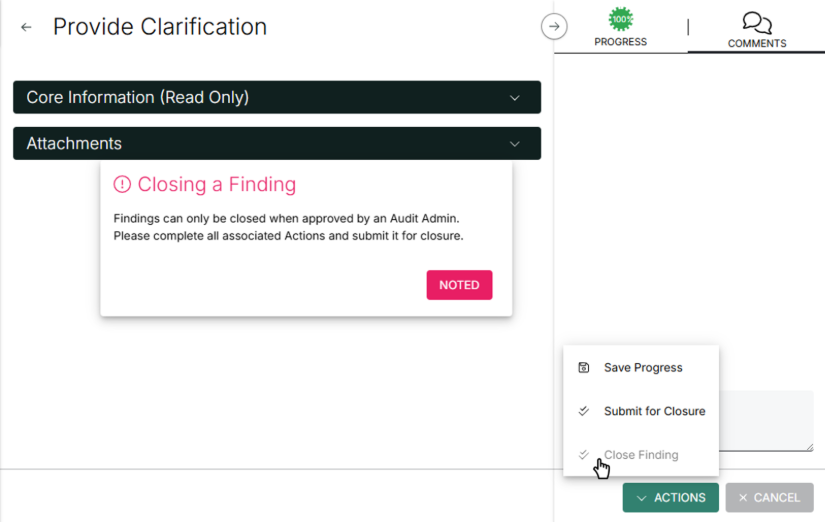
We have introduced the option to display unavailable form action buttons as visible but disabled, rather than hiding them completely. When enabled, these buttons will appear greyed out and can provide guidance explaining why the action is currently unavailable. This feature helps users better understand workflow requirements and reduces confusion about why certain actions are restricted. The guidance text is fully configurable, supports translations, and can be tailored to fit your specific processes and users.
In-Form Action Buttons
Configuration Required
We’ve introduced support for placing action buttons directly within forms, allowing buttons to be positioned alongside fields rather than being limited to the standard action bar. These in-form buttons maintain the same save and workflow capabilities as existing form actions, including support for conditional visibility rules. This enhancement offers greater flexibility in form and workflow design, enabling users to complete actions exactly where they are most relevant within the form experience.

Weighted Average Function Added to Data Aggregation Table
Configuration Required
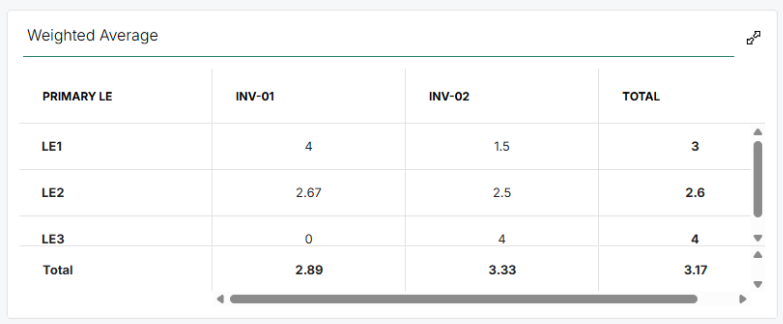
The data aggregation table introduced in version 3.4 enables users to perform aggregate operations in a tabular format. We have now added a weighted average function, which is especially useful for tasks such as risk scoring that require weighted calculations; for example, when entities being evaluated vary significantly in size or importance.
Improved Subform Loading Performance
Configuration Required
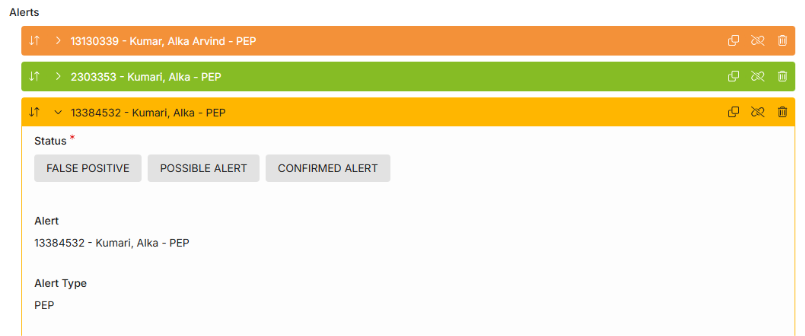
For sites that utilize features such as Third Party Risk Management, screening may return hundreds or even thousands of alerts for some third parties. While all this data can be viewed in a single Third Parties form for convenience, this has previously resulted in longer than expected load times with very large data volumes. We have delivered a significant performance enhancement by loading read-only fields—typically those set by integrations—on demand. Now, these fields are only retrieved when you expand the specific repeater you need, resulting in faster form loading and a more responsive user experience.
Scatterplot Chart Now Available
Configuration Required
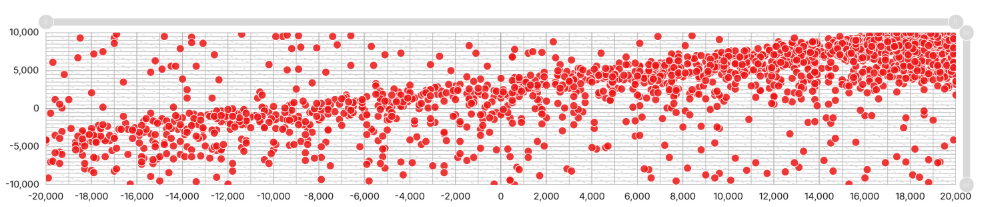
We have added a scatterplot chart to our library, which is now accessible in the reporting wizard. If you are already building your own dashboards, you can add scatterplots without any assistance from CoreStream GRC—just ensure you have upgraded to version 3.5. This enhancement allows you to quickly and easily visualize your data using scatterplots directly within your dashboards.
Treemaps Now Available with Drill-Through Capability
Configuration Required
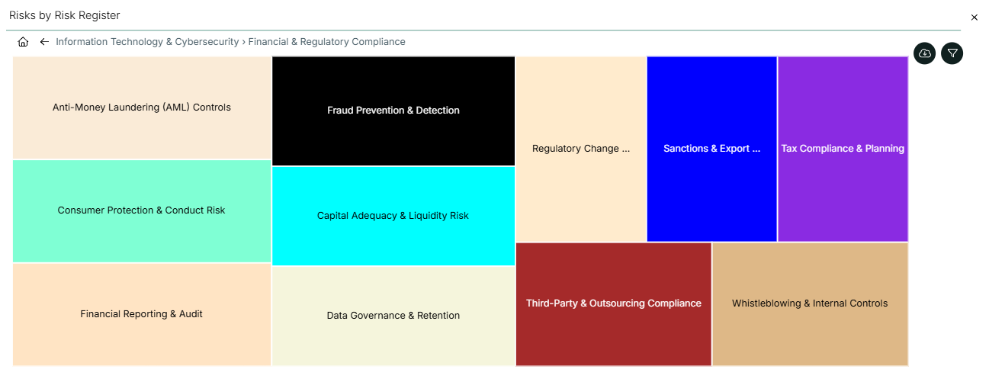
Treemap charts are now available and can be configured using the reporting wizard, allowing clients to create their own visualizations for dashboards. In addition to standard Treemaps, our team can enable drill-through functionality with some additional configuration; this means users can, for example, view Risks by Risk Register Level 1, click into a specific Level 1 and see the chart update to show Risks by Risk Register Level 2, and so on. A convenient breadcrumb navigation is included so you can easily return to previous levels.
3.2 Core features
Configurable Ordering for Sub-Form Repeaters
Configuration Required
Sub-form repeaters can now be configured to display records in a defined order based on a selected field, such as date, numeric, or text values. This enhancement provides greater control over the way related records appear within a form, resulting in a more logical and user-friendly layout. Additionally, the option to manually reorder items can be disabled to maintain a consistent, configured order as needed.
Enhanced Validation for Consolidated Hierarchy Fields
Automatically Added
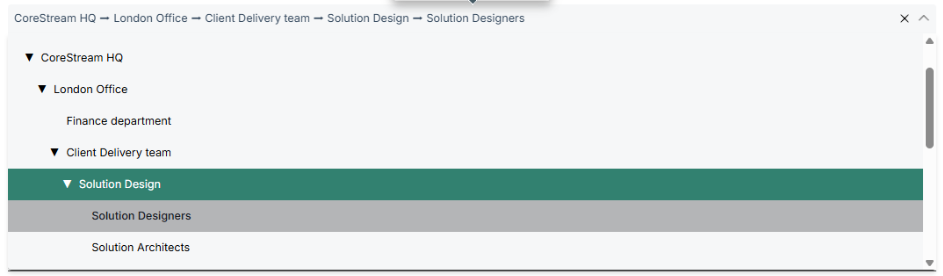
Consolidated Hierarchy fields allow users to combine multiple individual fields into a single field. Previously, if only two levels were selected but the top three levels were mandatory, users would only see a validation error upon attempting to save. With the new update, if the top three levels are required, users will be prevented from selecting at level 1 or 2 and will be prompted to select level 3 and below. This enhancement minimizes save-time validation errors and streamlines the entry of data within forms.
Enhanced Display of Attachment Names
Automatically Added
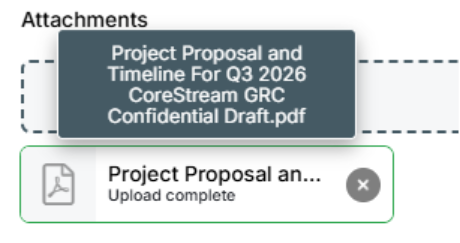
Attachment names are now displayed more clearly, with full file names visible on hover, making it easier to identify files without downloading them.
Custom Word Export Enhancements
Configuration Required
We have introduced several enhancements and fixes to Custom Word Exports, providing greater formatting flexibility and improving the reliability of exporting complex data. Linked content can now be configured to start on a new page between repeated sections, making large exports easier to read and organize. Additional improvements include better handling of lookups, improved export file naming, consistent formatting for multi-line text fields, and more reliable rendering of dynamic linked content, resulting in a more polished and dependable export experience.
Support for Negative Scoring in Data Aggregation Table
Automatically Added
Starting with version 3.5, the data aggregation table now supports negative scores, enabling coverage of a wider range of requirements and scenarios.
Enhanced Hover Text Visibility for Extended Data Values
Automatically Added
The display duration for hover text on long, multi-line fields in grids has been increased. Users now have more time to read detailed content directly from the grid view before the tooltip disappears.
Dashboard Grid Personalization Persistence
Automatically Added
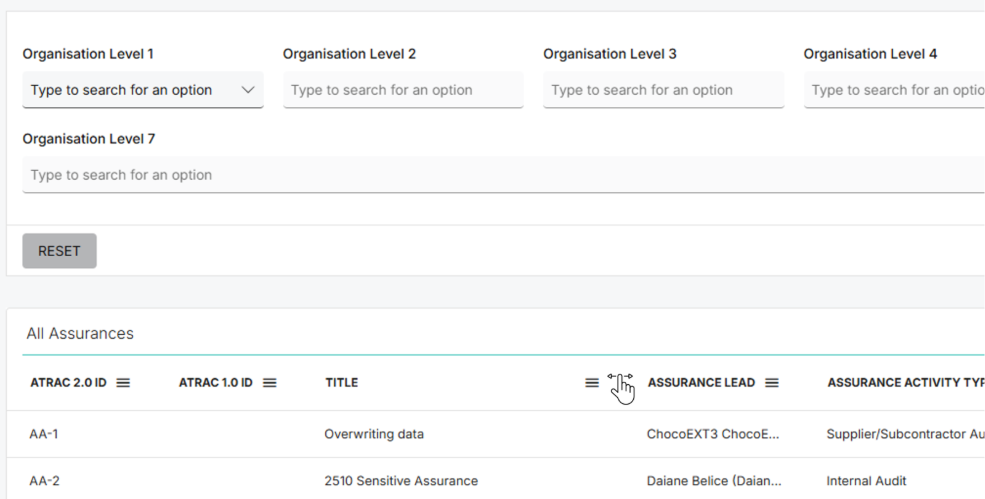
Grid personalization settings within dashboard grids are now retained when personalization is enabled. Changes such as column ordering and column selection will persist across sessions, eliminating the need for users to repeatedly configure their preferred grid layout.
3.3 Configuration improvements
Simplified Configuration Version Management
Automatically Added
Previously, reverting configuration changes was done by selecting a single date and time, which would reset the entire configuration to that point. Now, administrators can also access a new screen available for all sites that displays all configuration changes, allowing them to selectively revert specific changes without impacting work done by others. This provides greater control and precision when rolling back configurations.
3.4 Issue fixing
DataStream Processing Refresh Issue Resolved
Automatically Added
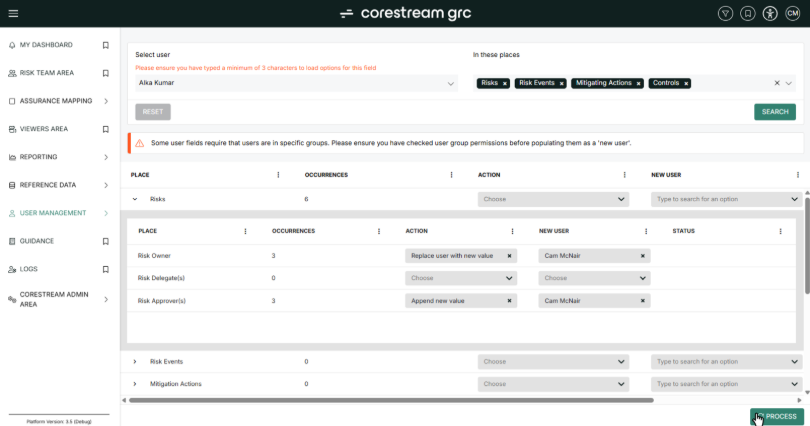
We have resolved an issue in DataStream that previously required users to refresh the page before performing additional bulk actions, such as updating user assignments. Users can now process multiple updates consecutively without needing to reload, delivering a smoother and more efficient experience when managing bulk user changes.
Excel Export Text Field Formatting Issue Resolved
Automatically Added
We have fixed an issue where certain text fields, such as custom IDs, in user-configurable Excel exports were incorrectly interpreted as dates (for example, “1.2.3” being converted to “01/02/2003”). Release versions, reference numbers, and other relevant text values will now maintain their correct formatting in exported files.
Duplicate Rows in Excel Exports
Automatically Added
In version 3.4, the introduction of support for multi-level linked data in exports caused an inconsistency where rows could be inaccurately duplicated when exporting specific linked data. This issue has now been resolved, ensuring that exports no longer produce duplicate rows.
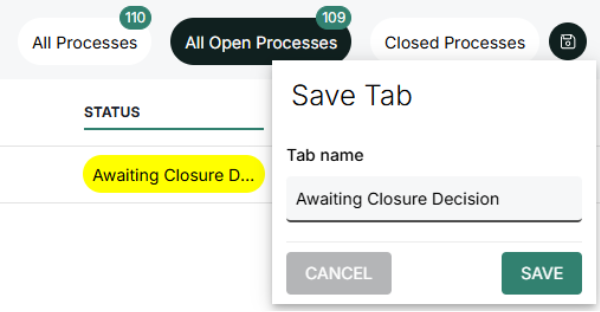
Personalized Tab Popover Improvement
Automatically Added
We have refined the popover behavior when creating a personalized tab. Previously, the popover would close if the mouse moved outside the box; now, it remains open, improving the user experience.
Section-Level Alerts Now Supported in Two-Column Mode
Automatically Added
When forms are presented in two-column mode, fields appear side by side for more efficient use of space. In version 3.5, section-level alerts now consistently display across the full width of the form, enhancing visibility and ensuring important information is easily noticed.
3.5 Integrations
SharePoint Integration Feature Enhancements
Automatically Added
The SharePoint attachments integration allows clients to centrally manage their master files in SharePoint while leveraging CoreStream GRC’s workflow and GRC capabilities. We offer a wide range of configurable options, including the ability to customize folder names rather than using only unique IDs. We have resolved an issue where, previously, attaching a file to a newly created record before the custom folder name was generated would result in attachments being stored in an orphaned SharePoint folder rather than being reassigned to the correct record. This improvement ensures greater consistency and reliability for your SharePoint file management.
3.6 Technical
Enhanced Integration of History Tracking and Workflow Logging
Automatically Added
We have added a new field for the Support team that directly connects history tracking with workflow logging. This improvement enables Support to quickly access corresponding workflow information from a specific history record, making it easier to understand how a record reached its current status and to review update details. This enhancement facilitates faster and more efficient resolution for our clients.
Configuration Promotion Efficiency Enhancement
Automatically Added
We introduced a minor update with significant impact by eliminating the programmatic addition of constraints to our history tables. Since history data—such as audit history—represents an exact copy of the corresponding record at a specific point in time and inherits constraints from the original audit, adding constraints to the history tables was unnecessary and resulted in additional processing. This update removes that overhead.
About Rich Eddolls
Richard is a co-founder and Chief Product Officer at CoreStream GRC, where he’s redefining the way organizations approach governance, risk, and compliance. With 20 years of experience in business-driven GRC system design and a background at Deloitte, Richard is all about challenging the status quo and delivering technology that actually works. As the visionary behind the CoreStream GRC platform, he’s committed to building solutions that don’t just promise change – but deliver it. Outside of the office, Rich is a golfer, soccer player, and proud husband and father, always looking for the next challenge – whether on the field or at home.
Follow Rich on LinkedIn here.
About Cam McNair
Cam is Head of Platform Design at CoreStream GRC, where he’s redefining how platform innovation happens – from solving day-to-day configuration challenges to building out features that scale. With a background in data analysis and technical solution design, Cam’s all about turning complex business needs into simple, powerful tools that actually work. He leads a team of Solution Architects who double as Product Owners, delivering real impact across the platform. As the driving force behind CoreStream GRC’s product evolution, Cam’s focused on creating solutions that don’t just tick boxes, but move things forward.
Follow Cam on LinkedIn here.
Frequently asked questions
CoreStream 3.5 introduces advanced reporting tools like scatterplots and treemaps with drill-through capability, enhanced data aggregation with weighted averages and negative scoring, and improved workflow flexibility with in-form action buttons. It also features an AI-Powered Configuration Assistant to streamline platform customization using natural language, helping teams deliver faster and more efficient GRC solutions.
The CoreStream AI-Powered Configuration Assistant allows users to configure forms using simple natural language instructions. It includes a preview mode, enabling teams to review and confirm proposed changes before applying them. This improves efficiency, reduces manual effort, and supports scalable configuration across complex GRC implementations.
CoreStream 3.5 enhances data analysis with new visualization options, including scatterplots and treemaps, plus drill-through functionality for deeper insights. Combined with weighted averages and negative scoring in data aggregation tables, users can perform more advanced analytics, including risk quantification, directly within the platform.
CoreStream 3.5 reduces friction by enabling workflow triggers within forms, faster subform loading, and clearer guidance for unavailable actions via disabled buttons with explanations. Additional usability updates—like improved exports, persistent dashboard settings, and better attachment visibility—create a smoother, more intuitive user experience.