
1.0 Document purpose
This document provides a summary of the highlights of the CoreStream GRC Release 3.6 release. Major Platform releases are finalized every 2-3 months depending on client and strategic priorities. These release notes are part of CoreStream GRC’s approach to keeping clients and partners informed of the improvements we are delivering.
This document summarizes the key user stories and issue fixes, categorized in the following ways, and specifies whether the change is available automatically as part of the upgrade, or requires a configuration change.
| Strategic features | The introduction of new Platform features considered to be of strategic importance. |
| Core features | Improvements to existing features or new functionality that is more limited in scope than the strategic features. |
| Configuration improvements | Changes relating to improvements to our approach to configuration, focused on improving the efficiency, accuracy and consistency of Platform configuration. |
| Issue fixing | The resolution of Platform issues. |
| Integrations | External applications or systems that CoreStream GRC has integrated with. |
| Technical | Improvements to the technical Platform elements. These improvements are typically non-functional. |
Please note that each category will not feature in every release update and some may be more heavily weighted towards certain categories. As always, the plan is to focus on those items that add the most value to our clients.
2.0 Platform team overview
CoreStream GRC 3.6 is now live, marking one of our most significant steps yet into enabling clients to integrate AI-powered capability into their workflows while continuing to sharpen the tools clients rely on for risk visualization and day-to-day planning.
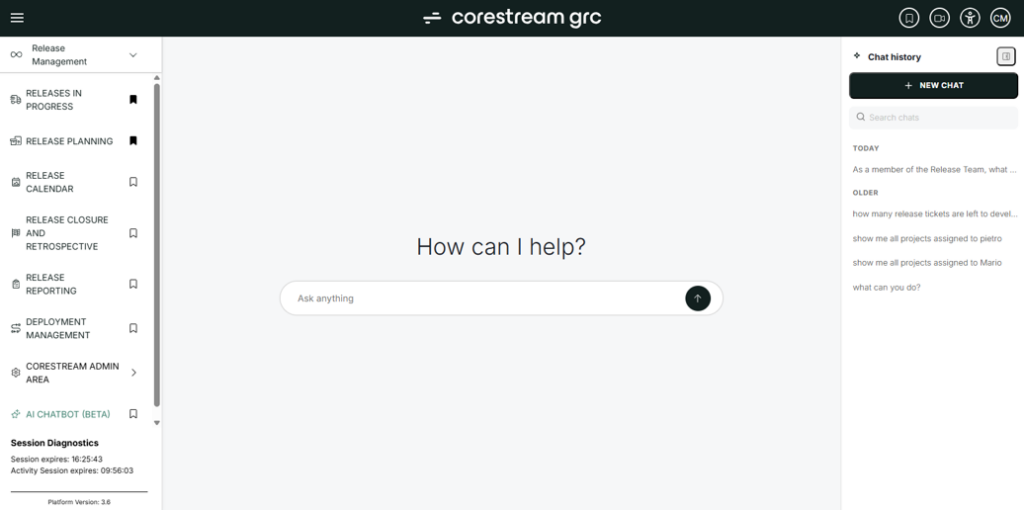
The headline addition is the first phase of our new AI Chatbot, giving users a natural way to ask questions about their own CoreStream GRC data and receive clear, text-based answers, with administrators free to choose which AI engine powers it. We have grand plans for this feature and will be releasing more information in the coming months. The aim is to make lives easier – allowing you to not just interrogate data but also make updates and create new items from abstract, unstructured sources. We believe this is a large part of the future for effective GRC: enabling unstructured inputs to result in structured data with minimal effort. The best of both worlds!
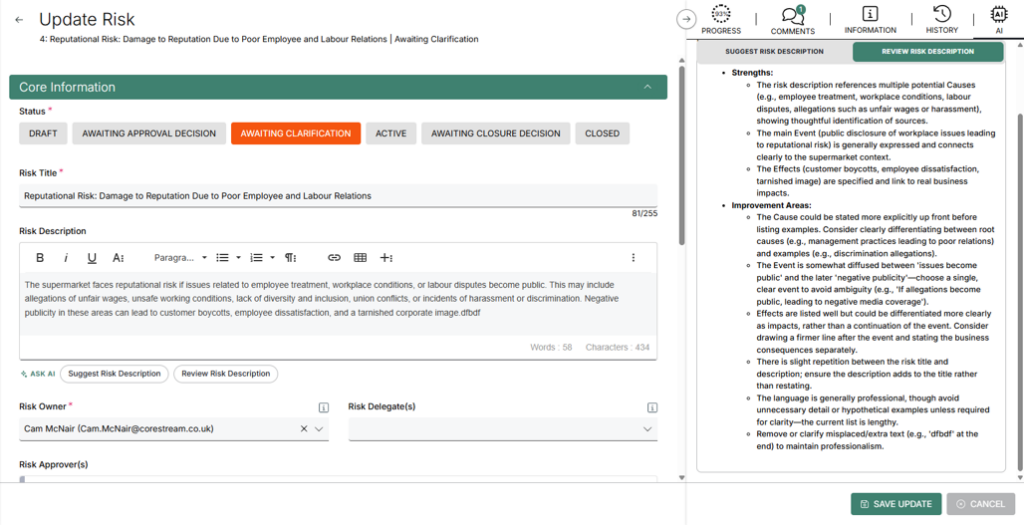
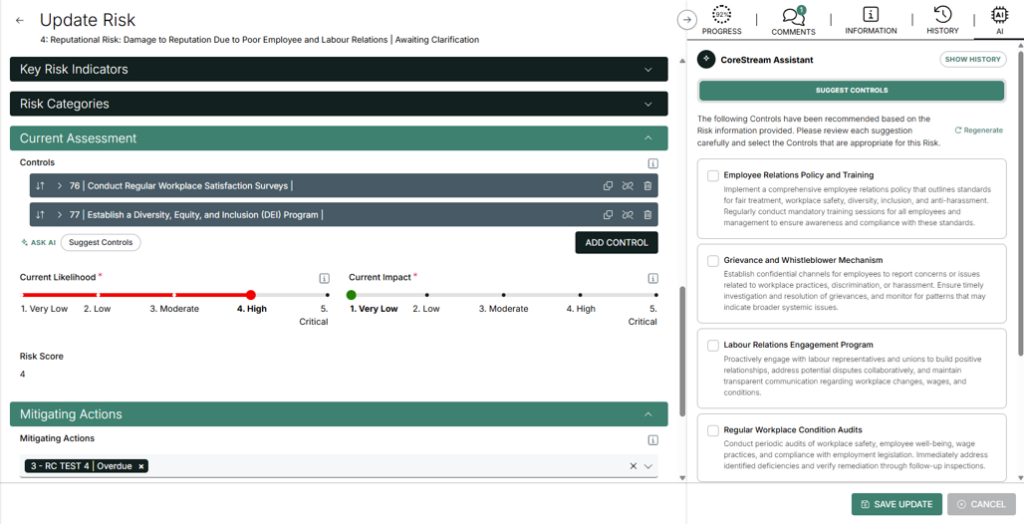
Alongside this, we have significantly extended our Forms ‘Ask AI’ feature to work more like a second pair of eyes, or an assistant, on your work. On a Risk record, for example, it can now review everything already captured in the form, the Title, Description, Causes, Consequences, Controls, and Mitigating Actions, and use that context to suggest things you haven’t thought of, flag existing entries worth a second look, or help write a clear Risk Description straight from the title. Together, these updates mark a meaningful step in how AI can support day-to-day work inside the CoreStream GRC platform, with further capabilities planned for upcoming releases.
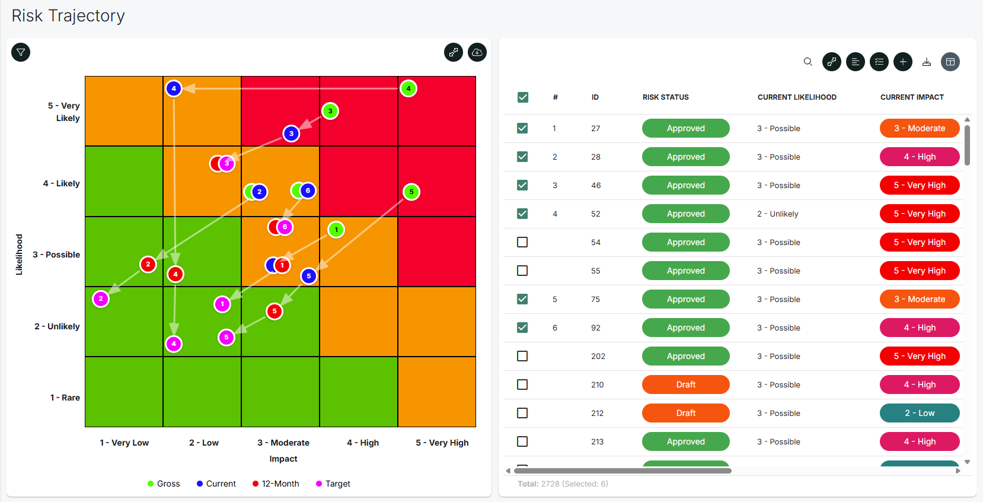
On the reporting and planning side, 3.6 introduces a new Risk Trajectory chart, giving clients a clear, visual way to track how risk exposure changes over time by plotting Gross, Current, and Target positions on a single visualization. We have also responded to client feedback on our calendar component with the addition of week and day views, making it easier to focus on what’s scheduled within a specific window of time. Together, these enhancements continue to broaden the ways CoreStream GRC helps clients visualize, interpret, and plan around their data.
Rich – Co-Founder & Chief Product Officer
3.0 Release Notes
3.1 Strategic features
AI chatbot – ask questions about your data (Phase 1)
Configuration required
We’re excited to share an early proof of concept for our new AI Chatbot, currently available internally in beta as the first step on a longer journey. Even at this stage, it already allows users to ask natural questions about their platform and CoreStream GRC data, with responses provided in clear text and grid formats. Administrators can select which supported AI engine powers the chatbot, including options like ChatGPT, Azure OpenAI, and Microsoft Co-Pilot; all searches are logged for review, and access adheres to existing content permissions, so users only see data they’re authorized to see. This is very much the start of the journey, and we’re looking forward to building it out further and bringing it to clients in future releases.
Forms ‘ask AI’ – major enhancements
Automatically added
We’ve significantly enhanced our Forms Ask AI feature. Previously, Ask AI could be used from within a single text field (such as Risk Description) and would recommend related content (such as Causes, Consequences, and Controls) based only on that field. It could not consider content you had already linked or associated, or other fields in the form, which limited both the input it could use and the suggestions it could produce.
Now, Ask AI is more flexible, with a completely revamped user interface. You can ask for feedback on a field, request that it be populated for you, and still create new content from that field. It can also account for what is already there. For example, from Controls, you can ask for other suggested Controls you may not have. Ask AI can further use additional fields in the form as context to generate more accurate answers.
We also made smaller, meaningful improvements to help AI-generated responses preserve formatting such as paragraphs, bold text, and bullet points for easier reading. Configuration has been streamlined, and additional refinements improve reliability and usability, along with a major user interface upgrade.
And as part of our AI strategy, the LLM used by Ask AI is completely configurable, ensuring you remain in control.
Risk trajectory chart
Configuration required
We have introduced a new Risk Trajectory chart that visualizes changes in risk exposure over time. This heatmap-style chart plots each risk assessment (such as Gross, Current, Target) using Impact versus Likelihood as connected points on a grid, with arrows indicating the direction of change. You can display up to 25 risks at once, with a dedicated table listing all risks, showing which are currently displayed, and providing controls to select or deselect risks, remove arrows for specific risks, and reposition risks to minimize overlapping lines during image exports. The chart supports the same filtering options as other charts, and both the chart and table can be exported. Your view is also personalized: changes such as selected risks or grid columns will be retained for your next session.
Generic integration support for direct LLM API connections
Configuration required
The Generic Integration framework now supports connecting directly to large language models, such as Azure OpenAI, via API. It includes the authentication and configuration needed to send requests, including attachments, directly to an LLM, giving you more flexibility for AI-powered automation in your CoreStream GRC configuration.
This capability is designed to be flexible. For example, you can ingest policy documents and automatically split them into the data structure required for CoreStream GRC Policy Manager. You can also streamline security questionnaires by adding attachments first, then prompting the LLM to extract and populate as much of the questionnaire as possible, leaving only the items that require manual input. As with any LLM-based approach, results depend on the quality of your prompts and the model itself. The best part is that CoreStream GRC makes it configurable, so if you have a specific LLM that works well for a particular task, we can configure it for you.
Calendar week and day views
Automatically added
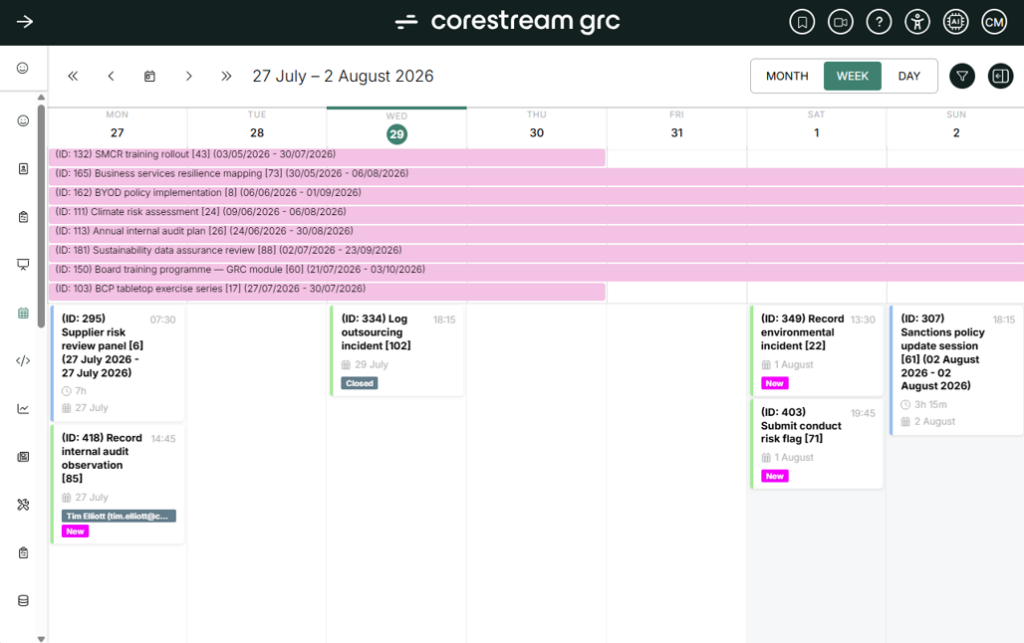
The calendar component now offers week and day views in addition to the existing month view, allowing users to more easily focus on scheduled activities within a specific week or day. Multi-day tasks are displayed across the top, while single-day events appear as cards on their respective days. Cards are now positioned according to start time and duration, and support has been added for more specific date-time values. Users can create new calendar content by clicking on a date, with relevant date fields prepopulated. Metadata such as Status and Owner can also be displayed on cards for quick reference.
Improved user impersonation controls
Automatically added
We have made several enhancements to user impersonation to strengthen auditability and ease of administration. Impersonation sessions are now logged in more detail for auditing purposes, required configuration is applied automatically across all sites, and deactivated users can no longer be impersonated.
In addition, impersonation is now more widely available through Group permissions, rather than relying on a dedicated admin role that CoreStream GRC previously managed on your behalf.
Quick selection sub-form view
Configuration required
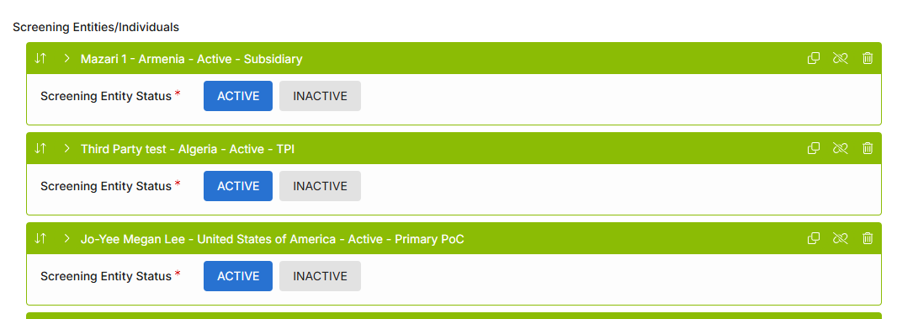
We added a new way to view and edit specific sub-form repeater entries. With the preview field, you can make targeted changes to the exact field or fields you need, without expanding every item.
For example, if you have a long list of Screening Alerts for an O&C for a Third Party, you can quickly identify likely false positives and move through the list faster, expanding only the entries that need closer review.
This makes it significantly easier to navigate and refine sub-form repeater content.
Simplified KPI table view
Configuration required
In a previous release, we introduced the KPI table to help you aggregate hierarchical data and related KPIs, such as risk register hierarchy tracking total open risks, overdue actions, and trends.
Now, you can also choose a simpler flat structure option. This is ideal for data that may not be hierarchical, such as Risk Category or other metadata, while still benefiting from a tabular KPI view.

Drill-across chart navigation
Configuration required
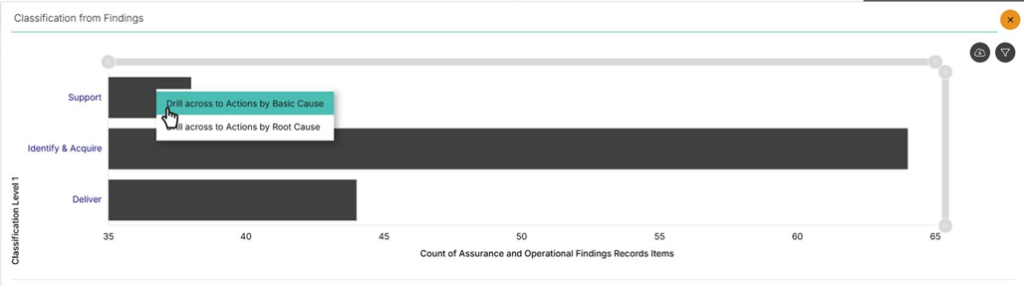
We have enhanced chart functionality to support drill-across navigation between charts representing different data sets. When drilling from one chart to another, you can now right-click to jump to related charts based on different data (e.g., from Findings by Classification Level 1 to Associated Actions by Basic Causes) while retaining your filter selections. This allows you to follow your analysis across multiple related charts and navigate both forward and backward through your analytical path.
3.2 Core features
Further custom word export enhancements
Configuration required
We’ve made further improvements to Custom Word Exports. Linked content can now be configured to start dynamic content on a new page between repeated sections, lookups referenced within dynamic linked content no longer cause an error, and multi-line text fields in dynamic linked content no longer overwrite their placeholder row formatting.
Safeguards for large stacked bar chart datasets
Automatically added
We introduced safeguards for stacked bar charts that use a lookup field for their series. These protections help prevent large datasets from making the chart or dashboard unresponsive. If a dataset is too large to load safely, you will see a message prompting you to apply additional filtering.
3.3 Configuration improvements
Automatically populate raw field values from action options
Configuration required
Action options in grids and tree views can now automatically set a field to a defined raw value, such as a specific line of text, when you create or update a record. This complements the existing capability to autoset values from other fields.
Support has also been added for Create action options, giving configurators more flexibility in defining what happens when a record is created or updated via an action. For example, you can set the Action Type on create for Actions from an Audits area to Audit Actions, and then, using the same form, set it to Mitigating Actions from the Risks area.
3.4 Issue fixing
Comments field now clears after saving and continuing
Automatically added
Previously, when you added a comment and selected Save and Continue, the comment was saved but it stayed in the input box. This sometimes led to confusion, with users worrying they might be duplicating comments.
Now, the comments field clears after you save and continue, so the screen reflects the saved state more clearly.
Corrected tooltip link behavior
Automatically added
Links added to tooltip content that include a target=”_blank” now open in a new browser tab as expected. This brings tooltip link behavior in line with alert messages.
PDF export issue resolved for large images
Automatically added
Resolved an issue where exporting a grid item containing a large image to PDF would fail with an error. Exporting the same item to Word was not affected and worked as expected.
Reporting wizard scroll behavior correction
Automatically added
When you opened the Reporting Wizard and then clicked cancel, the underlying dashboard could lose proper scrolling. This has been resolved, so you can return to the dashboard and scroll normally.
Improved excel export formatting
Automatically added
Excel exports now come in a cleaner format. Exports no longer include an initial title-only row above the column headers. Instead, the column headers appear as the first row, making the exported data easier to filter and analyze.
Hidden grid columns are now removed from saved personalized views
Automatically added
When grid columns are hidden from a collection’s configuration, they are now automatically removed from users’ saved personalized grid settings. This ensures that columns that were previously hidden no longer appear in personalized views, eliminating the need for users to manually clear their settings to reflect the update.
Navigation issue resolved for entity icons
Automatically added
We have fixed an issue where quickly clicking a home screen tile before its configuration had fully loaded could result in a 404 error. This issue has been resolved, and those speedy users should no longer experience this error when navigating so rapidly.
Export filtering fix for global context filters
Automatically added
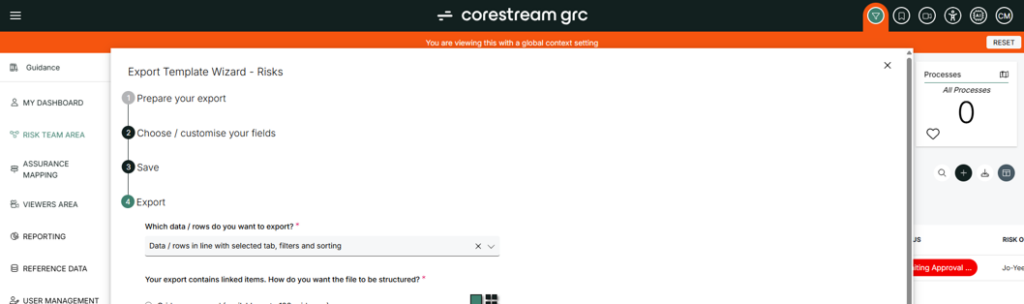
Fixed a compatibility issue where exporting with the “Data / rows in line with selected tab, filters and sorting” option did not correctly respect active Global Context Filters, resulting in all rows being exported instead of only the filtered subset.
Rich text field rendering improvements
Automatically added
We fixed an issue where rich text fields (also known as WYSIWYG, or ‘what you see is what you get’) could display their underlying HTML when showing long text, such as descriptions, as linked content in a grid.
This is now resolved, so you can add and view rich text content as intended.
3.5 Integrations
API export logging
Automatically added
API exports are now recorded in the Export Log, including the timestamp and export size. This gives administrators greater visibility into data leaving the platform through the API and supports investigation of any export-related issues.
3.6 Technical
Faster loading for end user exports
Automatically added
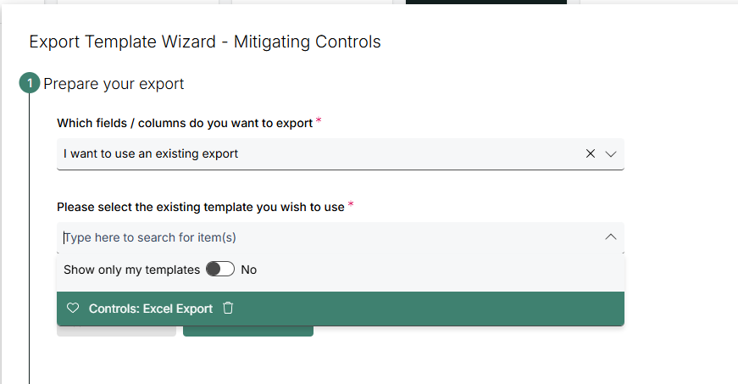
We improved how the End User Exports list loads. Instead of retrieving full configuration details for every export up front, CoreStream GRC now retrieves the export names first and loads the full configuration only after you select a specific export. This reduces load size and helps the page load faster.
Reduced storage footprint for choice fields
Automatically added
New choice fields can now be configured to use a smaller storage footprint, sized according to the length of available options rather than a fixed allocation. This update reduces the database storage required for each choice field. Optional support is also available to migrate existing choice fields to this reduced size, and migrations can be scheduled at times that minimize disruption to clients.
About Rich Eddolls
Richard is a co-founder and Chief Product Officer at CoreStream GRC, where he’s redefining the way organizations approach governance, risk, and compliance. With 20 years of experience in business-driven GRC system design and a background at Deloitte, Richard is all about challenging the status quo and delivering technology that actually works. As the visionary behind the CoreStream GRC platform, he’s committed to building solutions that don’t just promise change – but deliver it. Outside of the office, Rich is a golfer, soccer player, and proud husband and father, always looking for the next challenge – whether on the field or at home.
Follow Rich on LinkedIn here.
About Cam McNair
Cam is Head of Platform Design at CoreStream GRC, where he’s redefining how platform innovation happens – from solving day-to-day configuration challenges to building out features that scale. With a background in data analysis and technical solution design, Cam’s all about turning complex business needs into simple, powerful tools that actually work. He leads a team of Solution Architects who double as Product Owners, delivering real impact across the platform. As the driving force behind CoreStream GRC’s product evolution, Cam’s focused on creating solutions that don’t just tick boxes, but move things forward.
Follow Cam on LinkedIn here.
Frequently asked questions
CoreStream GRC 3.6 introduces new AI-powered features, including an AI Chatbot that allows users to ask natural-language questions about their GRC data and receive clear answers in text and grid formats. The release also significantly enhances the Forms “Ask AI” feature, enabling users to generate content, review existing information, identify gaps, and improve risk assessments using configurable AI models such as Azure OpenAI, ChatGPT, and Microsoft Copilot.
The new Risk Trajectory chart helps organizations vizualise changes in risk exposure over time. It displays Gross, Current, and Target risk positions on a single heatmap-style chart, allowing risk managers to track progress, identify trends, and monitor the effectiveness of controls and mitigation activities. The chart supports filtering, personalization, and export functionality for enhanced risk reporting and decision-making.
Yes. CoreStream GRC 3.6 introduces generic integration support for direct connections to large language models (LLMs) through APIs. Organizations can integrate platforms such as Azure OpenAI to automate tasks including policy ingestion, document analysis, questionnaire completion, and AI-powered workflow automation, helping to improve efficiency across governance, risk, and compliance processes.
CoreStream GRC 3.6 delivers several usability enhancements, including new calendar week and day views, improved user impersonation controls, simplified KPI table vizualisations, drill-across chart navigation, and a quick-selection sub-form view. These updates help users manage compliance activities, analyze risk data more effectively, and streamline day-to-day governance and risk management workflows.