
1.0 Document purpose
This document provides a summary of the highlights of the CoreStream GRC Release 3.7. Major Platform releases are finalized every 2-3 months depending on client and strategic priorities. These release notes are part of CoreStream GRC’s approach to keeping clients and partners informed of the improvements we are delivering.
This document summarizes the key user stories and issue fixes, categorized in the following ways, and specifies whether the change is available automatically as part of the upgrade, or requires a configuration change.
| Strategic Features | The introduction of new Platform features considered to be of strategic importance. |
| Core Features | Improvements to existing features or new functionality that is more limited in scope than the strategic features. |
| Configuration Improvements | Changes relating to improvements to our approach to configuration, focused on improving the efficiency, accuracy and consistency of Platform configuration. |
| Issue Fixing | The resolution of Platform issues. |
| Integrations | External applications or systems that CoreStream GRC has integrated with. |
| Technical | Improvements to the technical Platform elements. These improvements are typically non-functional. |
Please note that each category will not feature in every release update and some may be more heavily weighted towards certain categories. As always, the plan is to focus on those items that add the most value to our clients.
2.0 Platform team overview
CoreStream GRC 3.7 is now live, with a release focused on giving Configurators more control and making day-to-day use of the platform smoother and more dependable. The objective is cover even more ground for our clients and achieve robust and reliable outcomes.
With this aim in mind, button-specific mandatory field validation means forms can ask for the right information at the right moment, depending on the action a user takes. The AI-powered Configuration Assistant has also been expanded to cover more of the platform, including email and workflow configuration. This lays the groundwork for the assistant to draw on CoreStream GRC’s existing configuration tools in the next phase of its development.
We have also strengthened some of the foundations of the platform to make the experience better. Field-level version history now extends into sub forms, including nested sub forms, giving a full, field-by-field audit trail with no configuration needed. With improved resilience to short internet interruptions, a brief drop in connection no longer sends users back to the login screen, so they can carry on where they left off.
Visibility also takes a step forward. Grid columns can now display icons to let you assess things like risk trend, status or priority at a glance, so a grid of values can be read in seconds rather than scanned line by line. The Risk Visual view now supports multiple organization levels, giving a single impact by likelihood view across several areas and registers. Group-based access for the Integrated Video Library lets you tailor guidance content to different audiences within the same library. Together, these updates put insights at your fingertips.
The 3.7 release has also seen further progress on longer-term features (those that straddle multiple releases), which will be available before the turn of the year. This includes our AI chatbot (one we have grand plans for, having discussed use cases with a number of clients already) and our new Content Board which provides an alternative way for users to consume content in CoreStream GRC. More on these in the very near future!
Rich (Co-Founder & Chief Product Officer)
3.0 Release Notes
3.1 Strategic features
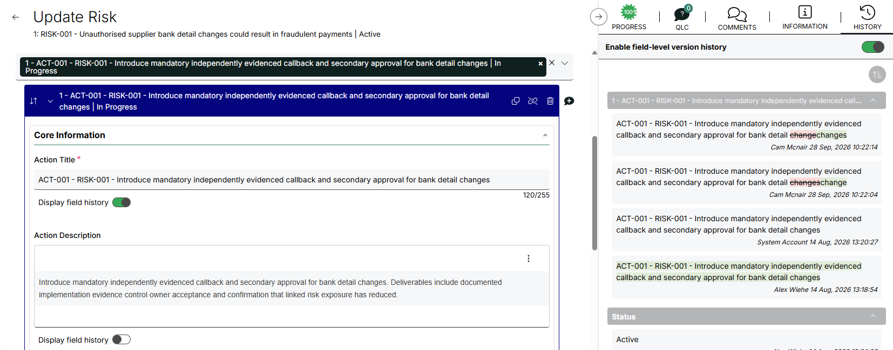
Field-level version history for sub forms
Automatically added
Field-level version history, previously available only for fields on a main form, is now also available for fields within sub form repeaters, including nested sub forms, with no additional configuration required.
The version history panel clearly indicates the related sub form record and field, and supports the same sorting and details users already have for main form fields.
Button-specific mandatory field validation
Configuration required
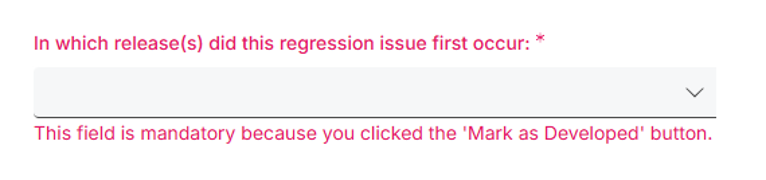
Buttons can now require additional mandatory fields only when that specific button is clicked, in addition to any fields that are always mandatory or conditionally mandatory based on predefined criteria.
When users select one of these buttons, submission is blocked until the required fields are completed. Each mandatory field is clearly marked, with guidance shown alongside it.
This behavior is consistent across both create and edit forms, and existing field-level mandatory validation remains unchanged. This gives you more flexibility in your forms, workflows, and overall user experience.
Icons for choice field values in grids
Configuration required
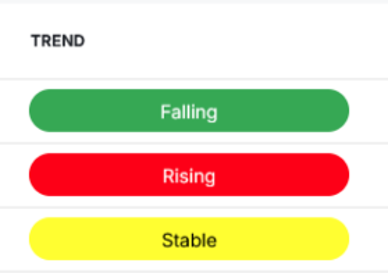
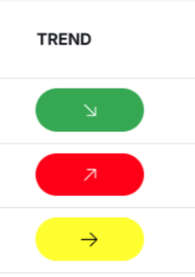
Choice field options can now be configured with an icon. In grids, the icon can appear either instead of or alongside the option text, with a configuration switch to control how icons are displayed. Hovering over a value always shows the text for clarity, and filtering displays both the icon and text. Cell coloring also follows the setting defined at the appropriate level (collection or grid).
Group-based access for the integrated video library
Configuration required
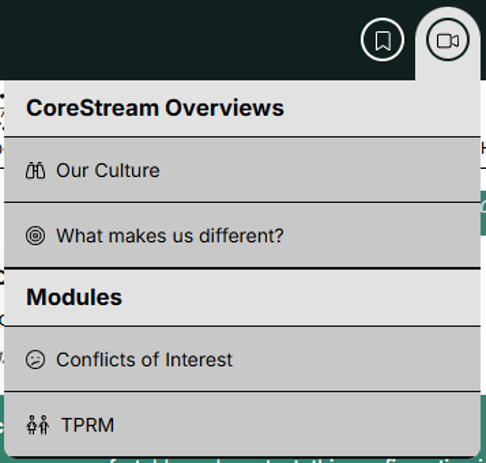
Individual videos and sections in your Integrated Video Library can now be restricted to specific groups. This lets you present different audiences, such as external and internal users or admins and standard users, with different content within the same library.
If a user does not have access to any videos within a section, the section is now hidden from their view entirely.
Add a visual marker to emails sent from non-Live platforms
Automatically added
Emails sent from non-live platforms, such as UAT, preproduction, and demo sites, now include a visual marker. This makes it immediately clear that a message did not originate from a live environment, helping to prevent confusion for recipients.

3.2 Core features
Expandable sub form create and edit enhancements
Configuration required
Expandable sub form repeaters can now be configured with separate forms for creating a new record versus viewing or editing an existing one. This gives configurators more control over what users see at each stage.
We also fixed an issue where using Save and Continue within an expandable sub form could cause the surrounding breadcrumb navigation to be lost. After saving, you’ll stay oriented within the parent form hierarchy.
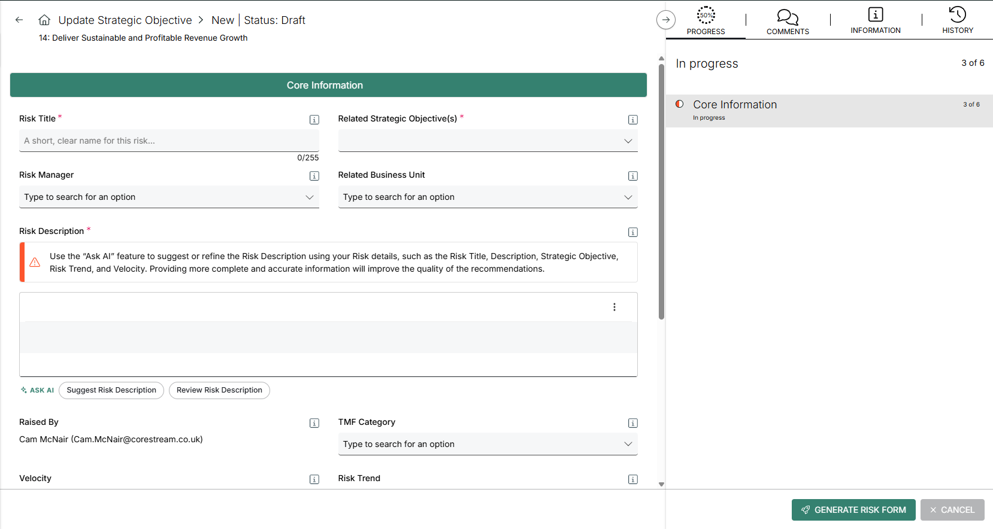
Improved resilience to short internet interruptions
Automatically added
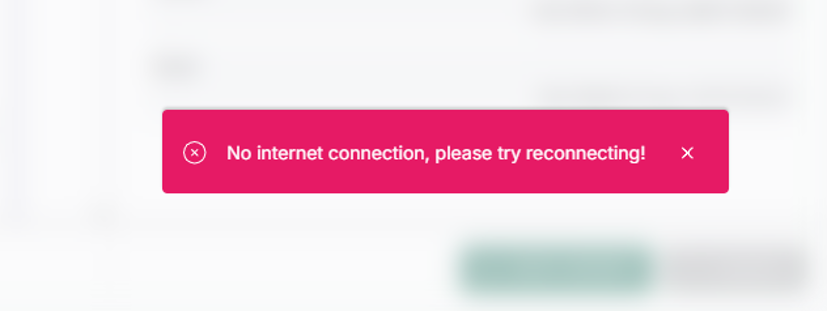
A brief loss of internet connection no longer logs users out immediately. If the connection is restored before the session expires, users can continue where they left off without returning to the login screen. Any unsaved work is restored, provided they did not attempt to navigate while offline.
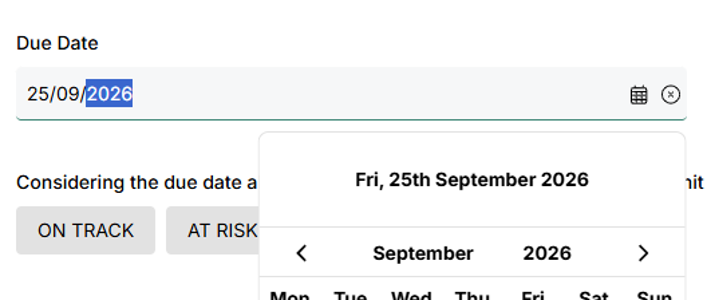
Type dates directly in date fields
Automatically added
Dates can now be typed directly into date fields, instead of requiring the calendar picker every time. This makes quick data entry faster. In addition, when you do use the calendar picker, selecting a date now closes the picker automatically.
Improved support for anonymous sub form lookups
Configuration required
We expanded the features which can be used in unauthenticated, or anonymous, forms (used for anonymous surveys or for external parties to create records without an account). Now we include support for sub form repeaters, and user creation.
Calculated fields can now use non-numeric sub form values
Configuration required
Calculated fields can now reference sub forms and the associated sub form data even when that data contains non-numeric values. This gives configurators more flexibility when building calculated logic that depends on related sub form content.
For example, in an Audit, you might add a calculated field that determines a status outcome based on related Findings or Actions. Rather than relying only on numeric values, the calculation can incorporate a non-numeric attribute from the linked sub form (such as a category, risk level label, or status) to help drive the parent Audit’s result.
Slider field display enhancements
Automatically added
We’ve refined the way slider fields are displayed to ensure the final value is fully visible. With these updates, values are no longer cut off or forced onto multiple lines.

Risk visual view now supports multiple organization levels
Configuration required
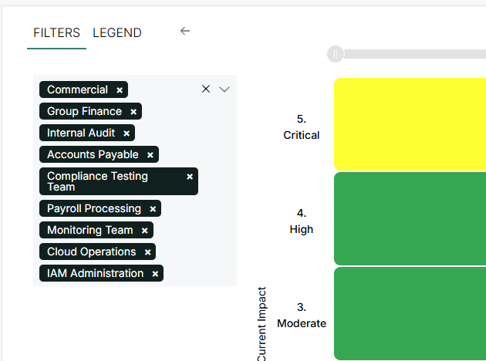
The simplified Risk Visual chart can now display risks from multiple Org Levels and registers in a single view, instead of limiting the display to one level at a time. This is ideal when you want a straightforward Impact against Likelihood view across several areas, without using the full escalation and aggregation logic for re-baselining risks at different levels. You can also review multiple registers you care about from one place.
Improved tracing between support logs and data retention records
Automatically added
We added trace-level linkage between background service logs and data retention records. This is an initial step toward helping the support team follow an error from the logs to the related underlying data, so they can investigate your queries faster and more accurately.
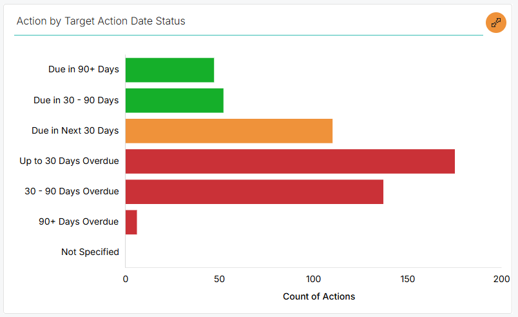
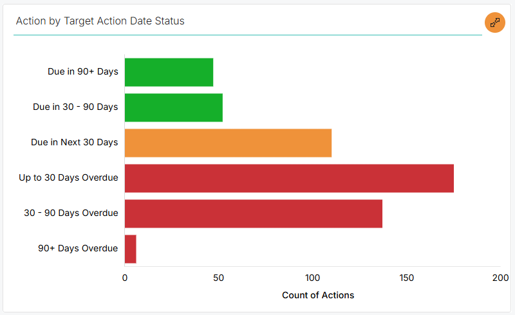
Show or hide the ‘not specified’ row in stacked bar charts
Automatically added
The ‘Not Specified’ row in aged stacked bar charts is now optional. Previously, it was always displayed, even when it did not apply to your dataset. You can now show or hide this row based on your preference, giving you more control over how your charts are presented.
More reliable system-generated version visibility in view versions
Automatically added
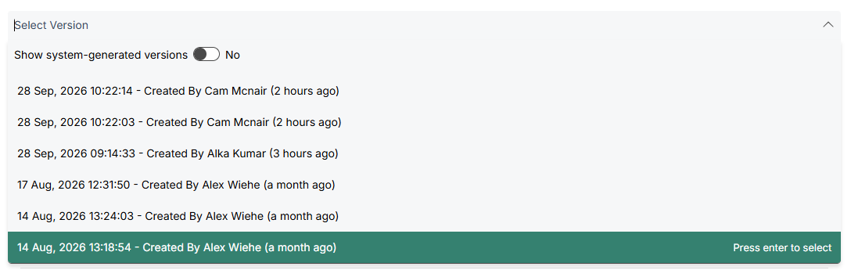
A small improvement has been made to the ‘View Versions’ switch that hides system-generated records. It now recognizes ‘System Account’ consistently, regardless of capitalization differences or other editable properties, making the behavior more reliable.
Simplified access for field-level version history
Automatically added
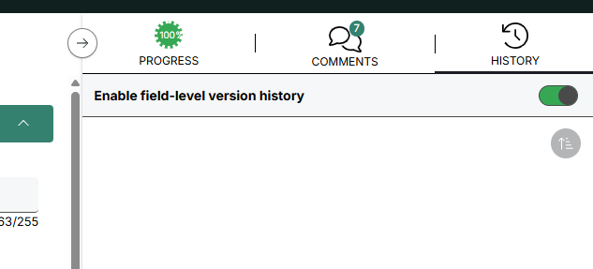
We streamlined access to field-level version history by removing unnecessary clicks. Previously, you had to launch the feature, enable it, and then navigate to your content. Now, we combine launching and enabling into a single, simpler flow.
3.3 Configuration improvements
Expanded AI configuration assistant capabilities
Automatically added
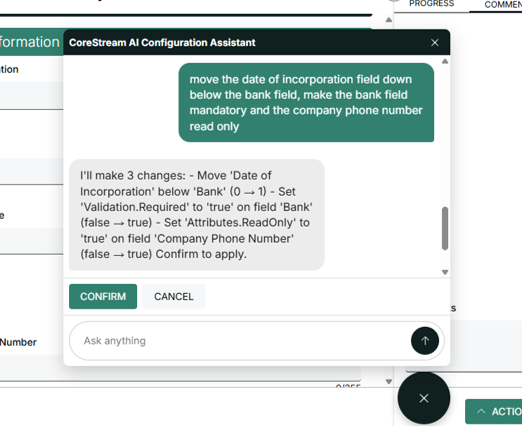
The AI Configuration Assistant now offers significant enhancements, including broader coverage across the existing forms. It also adds support for email and workflow configuration, so you can set up more areas with guidance from the assistant.
We also refined the underlying approach to support the next phase of development, including integration with CoreStream GRC’s existing configuration tools to further improve the assistant’s intelligence and capabilities.
Automated migration from single-select to multi-select
Automatically added
Single-select and multi-select lookups are stored differently in the database, so converting from one to the other requires creating a new junction table and migrating the existing data correctly. CoreStream GRC has automated this process and removed the need to handle it manually during configuration.
Faster translation configuration uploads and leaner storage
Automatically added
We made significant improvements to how translation configuration is stored and generated. You can now upload larger translation files using chunked transfer, unreferenced translations can be identified and removed, and duplicate translations are consolidated into shared items.
These updates reduce translation storage requirements and improve configuration transfer performance by more than 70 percent. Existing translated sites are unaffected, and go-lives can be completed more quickly.
3.4 Issue fixing
Improved date picker for small screens
Automatically added
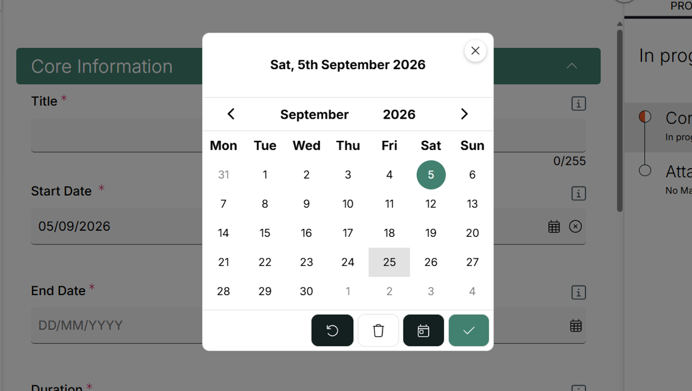
We fixed an issue where the date picker did not display well on smaller screens, making it harder to use. Now, the date picker opens centered on the screen for a smoother experience.
Excel export formatting correction for multi-line rich text
Automatically added
We corrected an issue where bullet point lists inside rich text fields were exported to Excel as plain text instead of maintaining their formatted list structure. This helps ensure your exported content looks as expected in Excel.
Resolved MFA login prompt for legacy links
Automatically added
We fixed an issue where users with a bookmarked legacy login link could be prompted to log in twice. CoreStream GRC now refreshes the login flow as soon as users open the outdated link, helping ensure they only go through the MFA process once.
Resolved email scan specific recipient delivery issue
Automatically added
Sending a Summary Email to a specific recipient email address (such as a dedicated mailbox) now works as expected. This resolves an issue that previously prevented delivery and required a workaround.
Navigation labels now wrap correctly
Automatically added
We fixed an issue where very long words in a navigation item could be cut off instead of wrapping to the next line, especially on some translated sites. Long single words now wrap correctly, with a hyphen added only when there is no other way to break the text.
3.5 Integrations
Refined cloud attachment code for improved performance
Automatically added
We refactored the code behind Cloud attachments (such as SharePoint) to improve code quality and maintainability, with no change to the end-user experience beyond a minor performance improvement.
3.6 Technical
Improved task generation performance with batching
Automatically added
We introduced batching for task generation to improve performance and reliability when running at scale.
Optimized junction table storage for better permission performance
Automatically added
We removed unnecessary system fields from junction tables to reduce the amount of storage used per row. This helps improve performance when evaluating permissions.
About Rich Eddolls
Richard is a co-founder and Chief Product Officer at CoreStream GRC, where he’s redefining the way organizations approach governance, risk, and compliance. With 20 years of experience in business-driven GRC system design and a background at Deloitte, Richard is all about challenging the status quo and delivering technology that actually works. As the visionary behind the CoreStream GRC platform, he’s committed to building solutions that don’t just promise change – but deliver it. Outside of the office, Rich is a golfer, soccer player, and proud husband and father, always looking for the next challenge – whether on the field or at home.
Follow Rich on LinkedIn here.
About Cam McNair
Cam is Head of Platform Design at CoreStream GRC, where he’s redefining how platform innovation happens – from solving day-to-day configuration challenges to building out features that scale. With a background in data analysis and technical solution design, Cam’s all about turning complex business needs into simple, powerful tools that actually work. He leads a team of Solution Architects who double as Product Owners, delivering real impact across the platform. As the driving force behind CoreStream GRC’s product evolution, Cam’s focused on creating solutions that don’t just tick boxes, but move things forward.
Follow Cam on LinkedIn here.
Frequently asked questions
CoreStream GRC 3.7 introduces several major enhancements, including field-level version history for sub forms, button-specific mandatory field validation, configurable grid icons, group-based access for the integrated video library, and expanded AI Configuration Assistant capabilities. These updates help improve visibility, configurability, and user experience.
The AI Configuration Assistant now supports more configuration areas, including email and workflow setup. It also lays the foundation for future integration with existing CoreStream GRC configuration tools, helping administrators configure the platform more efficiently and with greater confidence.
The Risk Visual view now supports multiple organizational levels and registers in a single view, making it easier to assess risks across different areas of the business. Field-level version history has also been expanded to sub forms, providing a more comprehensive audit trail for governance and compliance activities.
Users benefit from a range of usability improvements, including the ability to type directly into date fields, resilience to brief internet interruptions without being logged out, simplified access to version history, and enhanced chart and grid visualizations for faster decision-making.